


Participant
June 16, 2022
Answered

Highlight section in CHM-files

  • June 16, 2022
  • 4 replies
  • 235 views

I have upgraded a legacy RoboHelp (8) project to latest RoboHelp 2020. I've got most of the content in order but there are two differences between the legacy version's CHM files and the new versions CHM-files:


1. New CHM-files doesn't remember window position and size in between opening and closing the file.

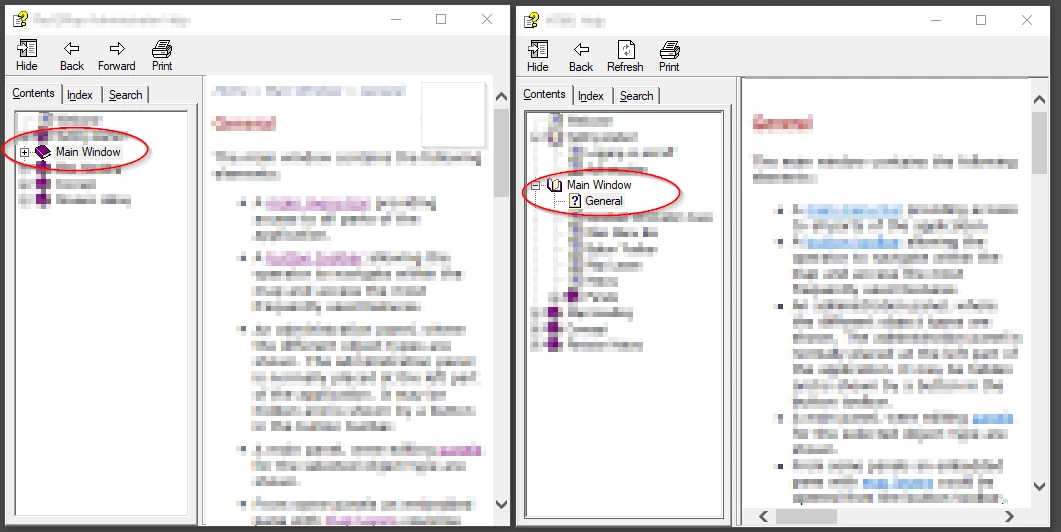
2. New CHM-file doesn't expand and highlight the section I've navigated to via links, see attached screenshot. The left window is generated from RH 2020 and the right is generated from RH 8. I've clicked a link in "Main Window" to "Main Window" > "General" in the same manner in both help files but the new one doesn't sync expansion and highlighting in the leftmost pane.


How can I adjust get the new version to behave like the one generated from the old RH?


Thanks in advance!
    This topic has been closed for replies.
    Correct answer Peter Grainge

    Not disagreeing with @Jeff_Coatsworth but in theory the reasons for going via 2019 Classic have been fixed within 2020.


    The first point is probably in the Window Settings. Go to the Output tab and check:-

    1.  A window has been defined.
    2. The Remember Window Size and Position check box is selected.
    3. Then check that window is selected in the preset.

    It's working for me.


    I'm not sure about the second question. I have a feeling that it might not be possible but unless someone else comes along with the answer, check with Support. See https://helpx.adobe.com/contact/enterprise-support.other.html#robohelp for your Adobe Support options. The email link tcssup@adobe.com is recommended as it reaches a team dedicated to Technical Communication Suite products including RoboHelp. 

    ________________________________________________________

    My site www.grainge.org includes many free Authoring and RoboHelp resources that may be of help.


    4 replies

    Participant
    June 16, 2022

    Thank you @Peter Grainge and @Jeff_Coatsworth for your replies. Apparently I didn't have the most recent version installed but updating didn't solve the issue.


    I attempted to install RH2019 but got an error "Update required Your browser or operating system is no longer supported (etc...)" I don't get this error with the most recent RH2020-installer, so I'm guessing it's not my OS/browser that aren't up to date?


    Anyways, @Peter Grainge comment about the window setting could solve both the window and highlight problems, a checkbox under Tri-Pane Options called Auto-synchronize TOC was unchecked. Checking that solved my issue!

    Jeff_Coatsworth
    Community Expert
    Community Expert
    June 16, 2022

    No that message is coming from the Adobe activation servers now that they've migrated off Internet Explorer - there's a helpx article out there that describes the workaround to get it activated someplace.

    Peter Grainge
    Community Expert
    Community Expert
    June 16, 2022

    What is the link, how is it written?

    ________________________________________________________

    My site www.grainge.org includes many free Authoring and RoboHelp resources that may be of help.


    Use the menu (bottom right) to mark the Best Answer or Highlight particularly useful replies. Found the answer elsewhere? Share it here.
    Peter Grainge
    Community Expert
    Peter GraingeCommunity ExpertCorrect answer
    Community Expert
    June 16, 2022

    Not disagreeing with @Jeff_Coatsworth but in theory the reasons for going via 2019 Classic have been fixed within 2020.


    The first point is probably in the Window Settings. Go to the Output tab and check:-

    1.  A window has been defined.
    2. The Remember Window Size and Position check box is selected.
    3. Then check that window is selected in the preset.

    It's working for me.


    I'm not sure about the second question. I have a feeling that it might not be possible but unless someone else comes along with the answer, check with Support. See https://helpx.adobe.com/contact/enterprise-support.other.html#robohelp for your Adobe Support options. The email link tcssup@adobe.com is recommended as it reaches a team dedicated to Technical Communication Suite products including RoboHelp. 

    ________________________________________________________

    My site www.grainge.org includes many free Authoring and RoboHelp resources that may be of help.


    Use the menu (bottom right) to mark the Best Answer or Highlight particularly useful replies. Found the answer elsewhere? Share it here.
    Jeff_Coatsworth
    Community Expert
    Community Expert
    June 16, 2022

    Is your RH2020 fully patched? (Patch 7 is the latest as of mid-June 2022)
    Did you go straight from RH8 to RH2020? If so, you may have issues that can be solved by going this route: RH8 to RH2019 Classic; RH2019 Classic to RH2020 New UI. Your RH2020 subscription includes access to RH2019's flavours.
