
Inspiring
May 15, 2020
Answered

Homepage wrecked?

  • May 15, 2020
  • 3 replies
  • 464 views

Hi, Everyone.


I don't know where to start in describing the problems of this output. Have a look at the homepage (Screenshot 1). Screenshot 2 is what the homepage is supposed to look like.


NOTE-1:  I'm using a new copy of the Oceanic skin. My previous usage of Oceanic got even more messed up than this, and I had to abandon it.


NOTE-2:  the output of the second topic is also broken. Notice the multiple breadcrumbs getting repeated. There's actually 35 breadcrumbs that extend off the screen (Screenshot 3).


SCREENSHOT 1
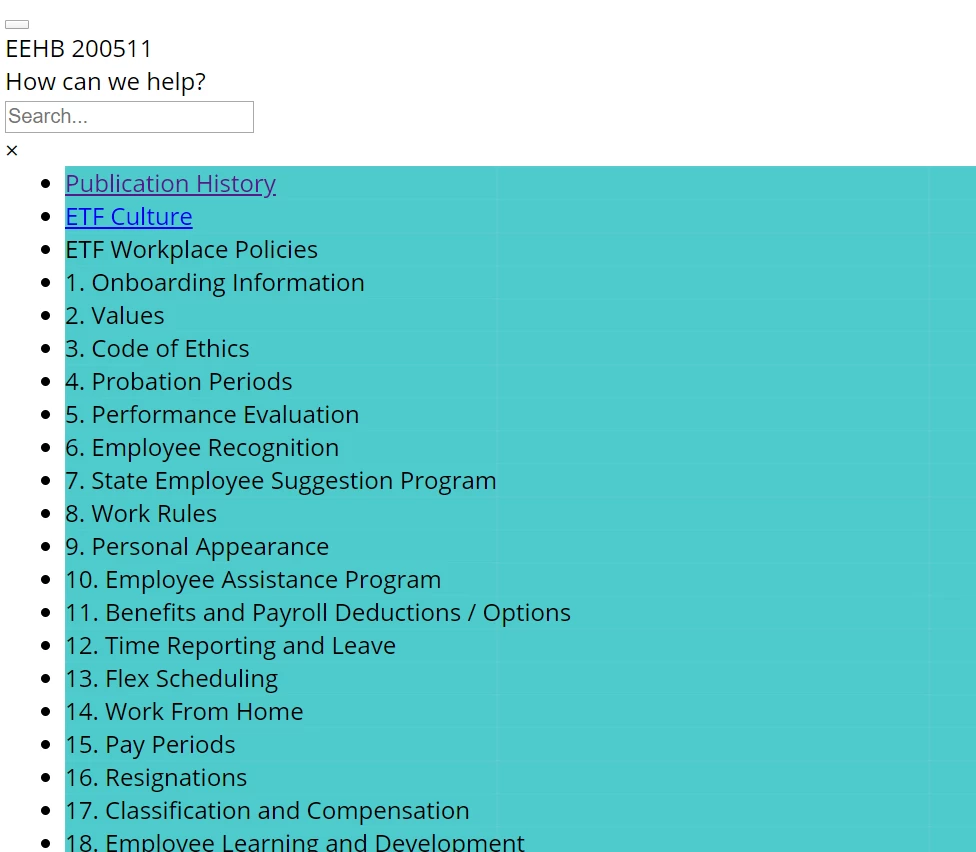
 

---------------------------------------------------------------------------

SCREENSHOT 2

 

----------------------------------------------------------------------------

SCREENSHOT 3



    This topic has been closed for replies.
    Correct answer martinl83372021

    Hi, Everyone.


    Just wanted to report a solution. My project/homepage seemed broken. But it turns out to have been a simple problem:  a link was pointing to a topic with a network address. The length of the file path might've been the problem. 


    As soon as I fixed that link -- i.e., pointed the link to the file on my hard drive -- the generated output returned to normal.


    BACKSTORY:   I had been experiencing slow performance in RH 2019. By adobe's advice, I moved my project folder from a network location to my hard drive. This greatly improved RH performance. However, that's when the output got messed up.  


    HOW I FOUND THE SOLUTION:  Peter gave me the idea of running a broken links report for a completely different problem. Sounded like a good thing to do for this problem. Sure enough, in the broken links report, I could see one link had an extra-long file path leading to a network drive. It was the only one. Light-bulb moment! Redirecting that link to my hard drive fixed it. 


    3 replies

    martinl83372021AuthorCorrect answer
    Inspiring
    May 21, 2020

    Hi, Everyone.


    Just wanted to report a solution. My project/homepage seemed broken. But it turns out to have been a simple problem:  a link was pointing to a topic with a network address. The length of the file path might've been the problem. 


    As soon as I fixed that link -- i.e., pointed the link to the file on my hard drive -- the generated output returned to normal.


    BACKSTORY:   I had been experiencing slow performance in RH 2019. By adobe's advice, I moved my project folder from a network location to my hard drive. This greatly improved RH performance. However, that's when the output got messed up.  


    HOW I FOUND THE SOLUTION:  Peter gave me the idea of running a broken links report for a completely different problem. Sounded like a good thing to do for this problem. Sure enough, in the broken links report, I could see one link had an extra-long file path leading to a network drive. It was the only one. Light-bulb moment! Redirecting that link to my hard drive fixed it. 


    Inspiring
    May 15, 2020

    Thanks, Peter. Just sent it.


    Martin

    Peter Grainge
    Community Expert
    Community Expert
    May 15, 2020

    Impossible to tell what you have done from that. Send the project as before and I will try to look over the weekend.


    Please include which preset is giving this.


    Use the menu (bottom right) to mark the Best Answer or Highlight particularly useful replies. Found the answer elsewhere? Share it here.