Known Participant
Aug 19, 2015 8:33 PM UTC
Question

Hover Text on Search and Index

I'm using WebHelp with Robohelp HTML version 11.

We're using a skin and 508 compliance checkbox is not selected, which is the display we want to use.

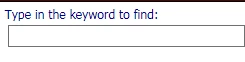
Is there a way to added hover text for "Type in the keyword to find?" Anyway to add this to the HHK file to as hover text?

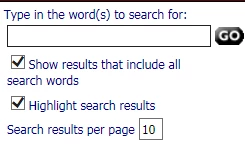
Is there anyway to add hover text for the "Type in the word(s) to search for" file in the Search tab?

Is there anyway to add hover text for the "Show results that include all search words" checkbox in the Search tab?

Is there anyway to add hover text to the "Highlight search results" checkbox in the Search  tab?

Is there anyway to add hover text to the "Search Results per page" checkbox in the Search tab?

Is there anyway to add hover text to the Search textbox in the upper-right order of the help window?

Thanks,


This topic is closed to new replies. Start a new post to keep the conversation going.

7 replies

Jeff_Coatsworth
Community Expert
Community Expert
Aug 24, 2015 2:33 PM UTC

I thought that the 508 flag would enable this sort of thing – maybe I’m mistaken.

Translate
BMcLeod1Author
Known Participant
Aug 24, 2015 2:37 PM UTC

It does, but, if you'll notice, this is what I initially states:

We're using a skin and 508 compliance checkbox is not selected, which is the display we want to use.

You cannot use a skin with 508 checked. We want to use a skin.

Translate
Jeff_Coatsworth
Community Expert
Community Expert
Aug 24, 2015 2:52 PM UTC

I think you’re SOL (sure out of luck) trying to combine the two; however, other people have packaged up 2 flavours of their project – one 508 version & one “good-looking” one. Then they let the client decide which one to access.

Translate
Peter Grainge
Community Expert
Community Expert
Aug 20, 2015 3:49 PM UTC

I'm curious as to why you would want to add hover text for something so simple. I cannot tell you how it can be done but if the problem is that you don't like the wording, you can change the text for some if not all of them in the LNG file.

Go to File > Project Settings > General tab > Advanced Button.


See www.grainge.org for RoboHelp and Authoring tips

@petergrainge

Translate
Use the menu (bottom right) to mark the Best Answer or Highlight particularly useful replies. Found the answer elsewhere? Share it here.
BMcLeod1Author
Known Participant
Aug 20, 2015 3:53 PM UTC

The problem is not the wording. The problem is that we want a screen reader such as JAWS to read the hover text so the a visually impaired user can hear the content for all of these fields.

Translate
Peter Grainge
Community Expert
Community Expert
Aug 22, 2015 12:55 PM UTC

OK I understand why you need this and I'm sorry I cannot help.


See www.grainge.org for RoboHelp and Authoring tips

@petergrainge

Translate
Use the menu (bottom right) to mark the Best Answer or Highlight particularly useful replies. Found the answer elsewhere? Share it here.