Participant
Jul 21, 2017 3:10 AM UTC
Answered

how can i add expansion button(submenu) to generated books?

Hi, I'm using Robohelp 2017 and having a problem adding this expansion button on my generated books and trees

Does anybody know how to add them in the list  and also make them appear when you open .chm file?
This topic is closed to new replies. Start a new post to keep the conversation going.
Captiv8r
Captiv8rCorrect answer
Legend
Jul 21, 2017 3:36 AM UTC

Hi there

When you compile the CHM file, look at the dialog.

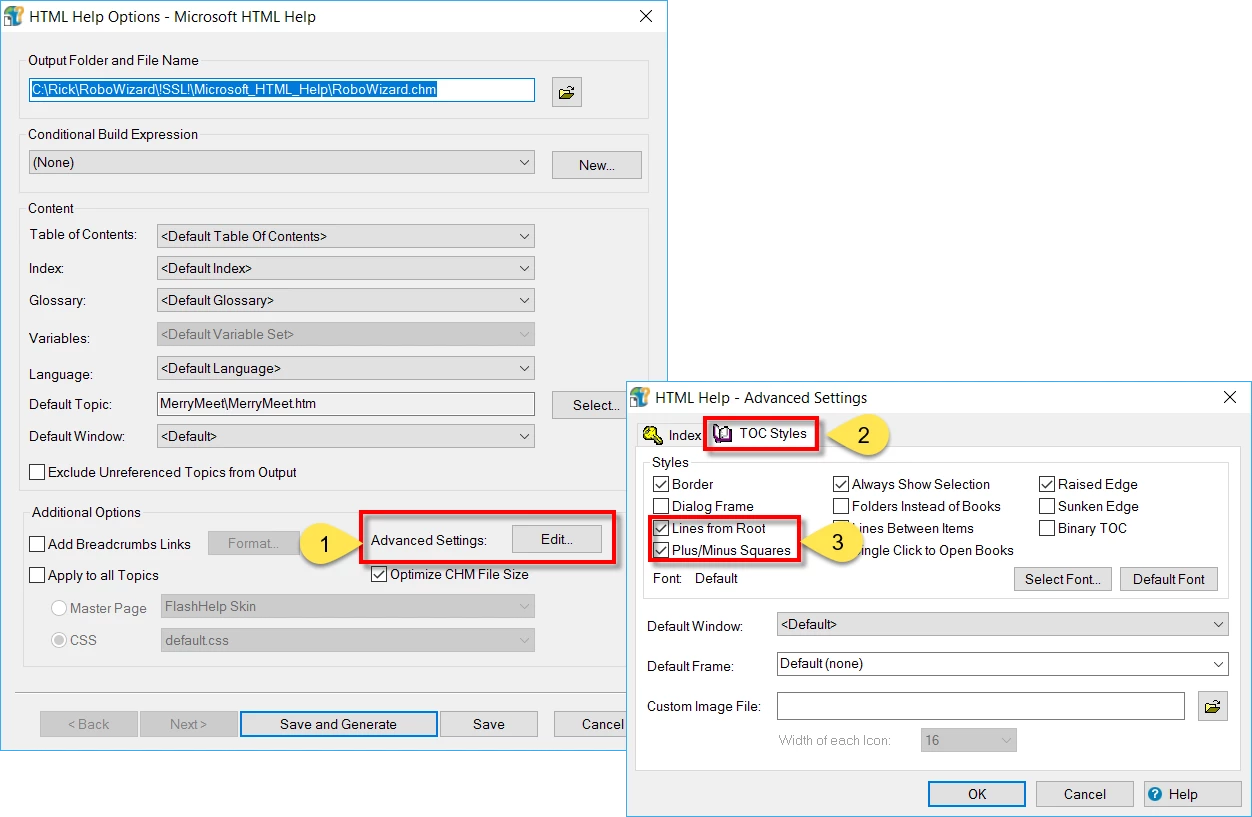
Click the Edit button next to Advanced Settings (1)

Then click the TOC Styles tab (2)

Then enable the options for Lines from Root and Plus/Minus Squares (3)

Cheers... Rick

3 replies

Participant
Jul 21, 2017 3:15 AM UTC

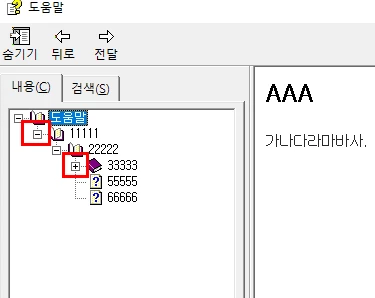
The attached figure is the sample of expansion button(submenu) and how i'd like to make my help file with them.

Translate
Captiv8r
Captiv8rCorrect answer
Legend
Jul 21, 2017 3:36 AM UTC

Hi there

When you compile the CHM file, look at the dialog.

Click the Edit button next to Advanced Settings (1)

Then click the TOC Styles tab (2)

Then enable the options for Lines from Root and Plus/Minus Squares (3)

Cheers... Rick

Translate
Participant
Jul 21, 2017 4:29 AM UTC

I'll get to it!! Thank you so much!!

Translate