
Answered
How can I build context sensitive help using URLs?
The vendor for the software I am creating Help files do not use any numbers, only URLs to call screens.

The vendor for the software I am creating Help files do not use any numbers, only URLs to call screens.
Thanks, and you're right, something is radically wrong. I have gone over these screens time and time again and can't figure out how or why this happens. This is the strangest vendor I have ever worked with. You can't even ask a simple question without them charging you. That's why I'm ready to give up on the context sensitive help and just deliver one complete thing. What output would you suggest would be the best for this?
Hi there
Here's the deal. When you open the help generically, you use a URL that looks something like this:
http://www.showmesolutions.biz/HelpExamples/WebHelp/index.htm
That's the start page for a RoboHelp output. Regardless of the topic that is presented in the window, the way WebHelp works is to present the same URL in the address bar.
To determine the exact URL of an individual topic, open the topic and right-click it. Choose an option on the context menu that will reveal the topic or page information. This should lead you to discover the actual URL that points to the topic itself. It may look something like this:
http://www.showmesolutions.biz/HelpExamples/WebHelp/New_Folder/Second_Topic.htm
If you have generated the WebHelp using the option "Show Navigation Pane Link In Topics", this should present a link that could be clicked to present the full WebHelp frameset with the desired topic in view.
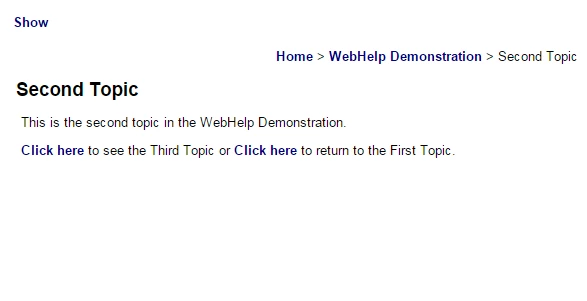
And here is the topic in the full WebHelp frameset
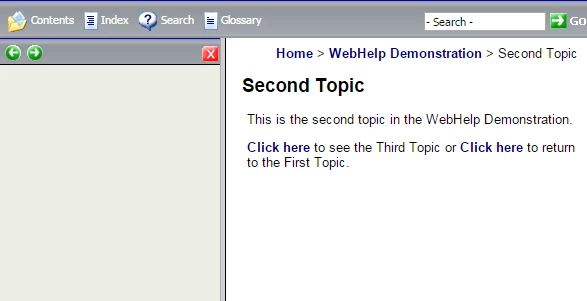
So at this point you have a decision to make.
Do I want the context sensitive call to present the user with only the topic? If so, just note the URL you recorded that leads to the topic.
Or do I want the context sensitive call to present the full WebHelp frameset with the proper topic loaded? If that's what you want, you will need to present the topic, then click the Show link, then note the URL that is presented in the address bar of the browser. It will typically look something like this:
http://www.showmesolutions.biz/HelpExamples/WebHelp/index.htm#New_Folder/Second_Topic.htm
Note the path one would normally see to open the help has now been appended to with the #New_Folder/Second_Topic.htm
Hope this helps a bit... Rick 
Already have an account? Login
Enter your E-mail address. We'll send you an e-mail with instructions to reset your password.


 AdChoices