roryj86911642
Inspiring
February 14, 2019
Answered

How can I display topic font background color (h1, h2, etc.) styles in output?

  • February 14, 2019
  • 1 reply
  • 990 views

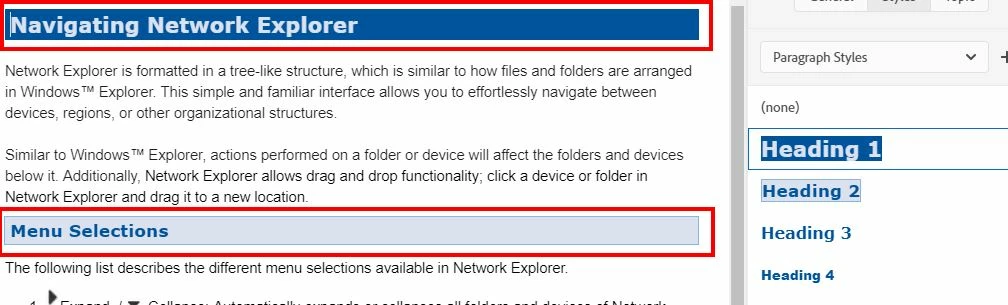
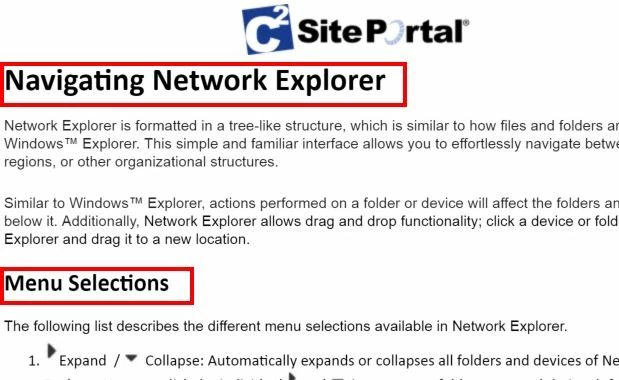
I have set up my topic headers (Heading 1, Heading 2, Heading 3, etc.) to include a background color as well as font color, but when I generate my HTML Preset the styles are not displayed. My skin is Azure Blue. I have set up my heading styles as per screen capture on left below. But when I my generate my preset those heading styles are not included. Please help.

Heading styles in topics
Output does not display heading styles
This topic has been closed for replies.
Correct answer Peter Grainge

I thought the ability to apply an overriding CSS was in the presets but certainly it is not with Update 5 applied. Do you have a master page applied to your topics and does that have the required CSS applied to it?


See www.grainge.org for free RoboHelp and Authoring information.

@petergrainge

1 reply

Jeff_Coatsworth
Community Expert
Community Expert
February 14, 2019

Check the CSS that the output is using - are they defined correctly in it?

roryj86911642
Inspiring
February 14, 2019

Hi Jeff,

I don't see where you assign CSS in output?? I checked my output HTML preset (General, Content, Layout, Search, and Publish) and there is no place to assign a style sheet.

roryj86911642
Inspiring
February 14, 2019

Below is screen capture my default CSS describing h1 heading.