

How can I get background-images from CSS to appear in printable output?
We're using the latest RH 2015. I have a Windows 10 x64 bit computer.
In our help projects we added images as background images onto our note box styles (notes, warnings, cautions, hints etc.). Here's a portion of our CSS:
.Important, .ImportantLong {
background-image: url(important.png);
}
.Example, .ExampleLong {
background-image: url(example.png);
}
.Hint {
background-image: url(hint.png);
}
.Caution {
background-image: url(caution.png);
}
.Warning {
background-color: #D8292F;
background-image: url(warning.png);
border-color: #000000;
color: #ffffff;
}
In the our htm pages it renders like this:
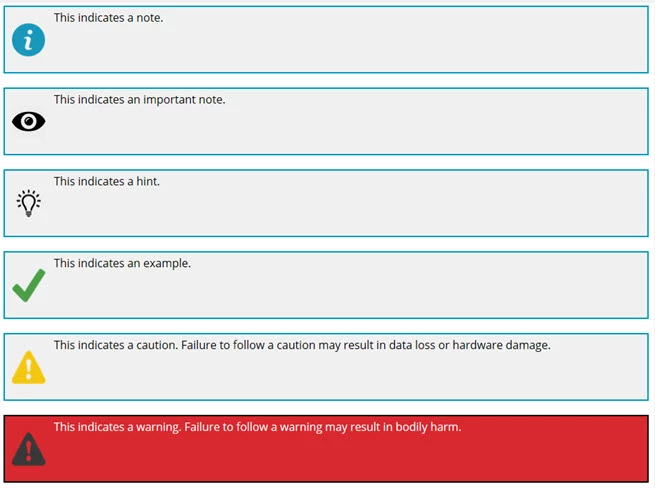
Here's the HTML code if you're interested:
<div class="droptext" id="POPUP717251270" style="display: none;">
<p>Throughout the documentation, you'll find special boxes that offset
the documentation. Here is what they mean:</p>
<p class="Note">This indicates a note.</p>
<p class="Important">This indicates an important note.</p>
<p class="Hint">This indicates a hint.</p>
<p class="Example">This indicates an example.</p>
<p class="Caution">This indicates a caution. Failure to follow a caution
may result in data loss or hardware damage.</p>
<p class="Warning">This indicates a warning. Failure to follow a warning
may result in bodily harm.</p>
</div>
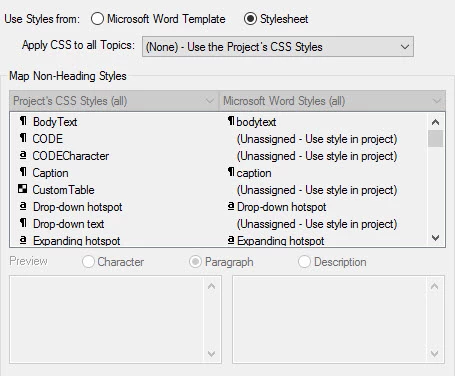
When I generate the printed output, on the appearance dialog box, I choose the project's css:
But in our printed documentation, the background images do not appear:
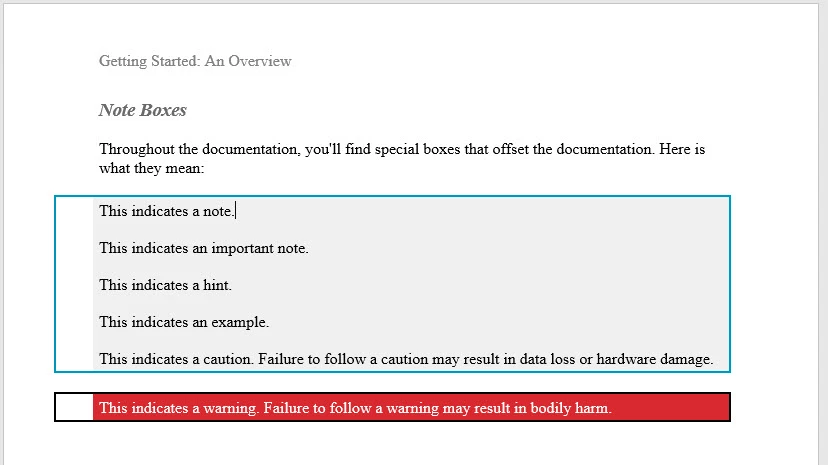
This poses a major concern since we use this style sheet across multiple projects and have hundreds of these note-box styles. Any suggestions?


 AdChoices