



johnvarvatsis
Inspiring
Mar 27, 2018 3:15 PM UTC
Answered

How can I make a back button in a topic?

I've created several topics which will be accessed from several places in my help system. When the user has finished reading the topic, they should be able to navigate back to the topic they were reading.

The only way they can do that is via the browser's back button. It would be nice if I could do this using a built in button. is this possible?

This topic is closed to new replies. Start a new post to keep the conversation going.
Captiv8r
Captiv8rCorrect answer
Legend
Mar 27, 2018 4:07 PM UTC

Hi there

This should be easy. You first need to decide if you want an actual button object or if you are happy with just an image that looks like a button that the user will click. Or, possibly, you want to supply just text to click.

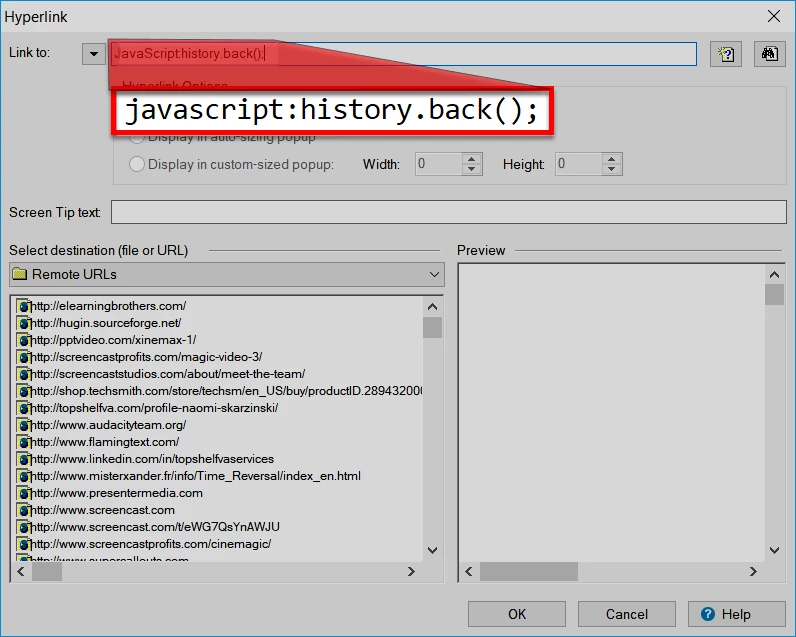
The image or text is likely the simplest. What you would do is to perform the same steps you would if you were creating a hyperlink. But where the link destination goes, you add a small bit of JavaScript. It should look like this:

In case you want to copy the code, here it is:

javascript:history.back();

Cheers... Rick

2 replies

Captiv8r
Captiv8rCorrect answer
Legend
Mar 27, 2018 4:07 PM UTC

Hi there

This should be easy. You first need to decide if you want an actual button object or if you are happy with just an image that looks like a button that the user will click. Or, possibly, you want to supply just text to click.

The image or text is likely the simplest. What you would do is to perform the same steps you would if you were creating a hyperlink. But where the link destination goes, you add a small bit of JavaScript. It should look like this:

In case you want to copy the code, here it is:

javascript:history.back();

Cheers... Rick

Translate
johnvarvatsis
Inspiring
Mar 28, 2018 7:15 AM UTC

Brilliant! Thanks

Translate