
October 10, 2012
Question

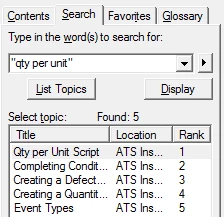
How can I remove the Location column from the search results in a .chm file?

  • October 10, 2012
  • 1 reply
  • 705 views

How can I remove the Location column from the search results in a .chm file?

I generated the file in Robohelp HTML 9.

As far as I know it's used when you've combined more than one source into the final help file. It is possible (though I don't remember doing it) that I did that once a couple of years ago but now I'm only using one source - the project that's generating the .chm.

Can anyone tell me how I can remove it?

Thanks

Tom
This topic has been closed for replies.

1 reply

Peter Grainge
Community Expert
Community Expert
October 10, 2012

In Project Setup look at the Window properties. I think you will find Advanced Search is ticked.


See www.grainge.org for RoboHelp and Authoring tips

@petergrainge

Use the menu (bottom right) to mark the Best Answer or Highlight particularly useful replies. Found the answer elsewhere? Share it here.
October 11, 2012

Thanks, Peter. That sorted it. I think they could definitely do with mentioning that functionality in the documentation.