Texas Techwriter
Inspiring
February 4, 2022
Answered

How can I remove the numbers in the Mini TOC?

  • February 4, 2022
  • 2 replies
  • 312 views

I am using RoboHelp Version 2020.7.46.

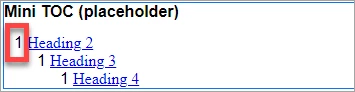
When I insert a Mini TOC it has numbers. I would like to either remove them or replace them with bullets.


    This topic has been closed for replies.
    Correct answer Amebr

    As Peter suggests, setting up numbering can cause this.


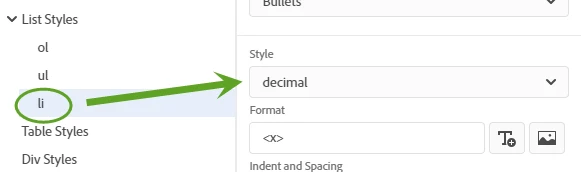
    The most likely scenario in my experience is that you have the li tag set to list-style-type: decimal. It was pretty common for older Classic projects so if your project has been upgraded then this is something to check for. In your stylesheet look for li, then the Style field. If it says 'decimal' change it to 'none' (This screenshot is from Classic, but while the look is a bit different the location should be very similar). I don't think this should be set in any autonumbering scenarios, but as always, do take a backup before you change anything.


    It's also possible you have ol set to the same value. If this is the case I would suggest a different fix, as changing that will almost certainly break your styles. Post back if changing the li doesn't fix the issue, and also let us know what the ol style is set to and I can post my recommendation for that part.

    2 replies

    AmebrCommunity ExpertCorrect answer
    Community Expert
    February 6, 2022

    As Peter suggests, setting up numbering can cause this.


    The most likely scenario in my experience is that you have the li tag set to list-style-type: decimal. It was pretty common for older Classic projects so if your project has been upgraded then this is something to check for. In your stylesheet look for li, then the Style field. If it says 'decimal' change it to 'none' (This screenshot is from Classic, but while the look is a bit different the location should be very similar). I don't think this should be set in any autonumbering scenarios, but as always, do take a backup before you change anything.


    It's also possible you have ol set to the same value. If this is the case I would suggest a different fix, as changing that will almost certainly break your styles. Post back if changing the li doesn't fix the issue, and also let us know what the ol style is set to and I can post my recommendation for that part.

    Texas Techwriter
    Inspiring
    February 7, 2022

    That worked! I'm not using Classic, but the newest RoboHelp. The file was originally created 5 years ago and not by me so who knows what is in there. 

    Community Expert
    February 7, 2022

    Yep, the project has been upgraded from Classic, so I presume the li setting probably came from RH11 or RH2015. While the upgrade process cleans up a lot of junk code, it typically doesn't touch valid css or html, which this example happens to be (although I don't generally recommend setting the style on an li).

    Peter Grainge
    Community Expert
    Community Expert
    February 5, 2022

    That is not default behaviour. Look in the sample projects and you will not see it in either of them.


    Do any of your styles have numbering applied to them?

    ________________________________________________________
    My site www.grainge.org includes many free Authoring and RoboHelp resources that may be of help.


    Use the menu (bottom right) to mark the Best Answer or Highlight particularly useful replies. Found the answer elsewhere? Share it here.