Participating Frequently
May 27, 2015
Answered

How can I search for all topics in my guide? & if that's not possible, how can I have the books not have topics with the same name?

  • May 27, 2015
  • 2 replies
  • 628 views

How can I search for all topics in my guide? & if that's not possible, how can I have the books not have topics with the same name?

This topic has been closed for replies.
Correct answer Captiv8r

"People need to be able to search these without having to look inside each TOC book."

Sorry, but I'm not a huge fan or user of this "New kid on the block" Responsive layout. So it may be that I'm misunderstanding simply because I don't regularly use it. From what you are saying, it sounds to me as if you (or more accurately your users) are not able to click on the right side where it says "Getting Started" or "Email Campaign List" and see those topics open and show the content with the search terms highlighted?

As for the "bookmarks", those are normally hidden from the user and will not be searchable unless the bookmark name also appears as text inside the topic. Although, if the two are different, you could likely make it happen by adding the bookmark name as a search keyword in the Topic Properties.
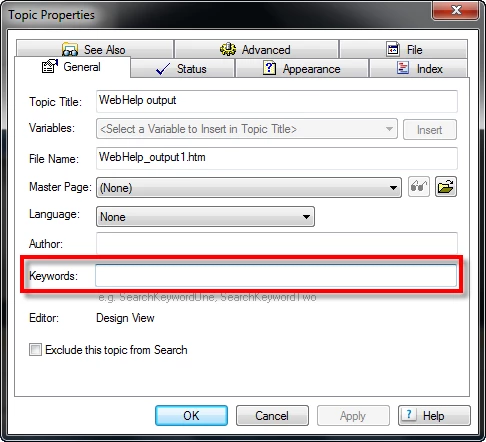
At any rate, I sense that at this point I may simply be frustrating you and you may need another person to try and assist that will likely understand the issue better.

Sorry I wasn't able to help.

Cheers... Rick

2 replies

Participating Frequently
May 27, 2015

Hey Rick I know you're trying but if you look at my question, I'm trying to figure out how I can make 'Navigation Bar' and other bookmarks or topics appear in the search results. The only thing that shows up in my search results are the actual TOC books. People need to be able to search these without having to look inside each TOC book.

Captiv8r
Captiv8rCorrect answer
Legend
May 27, 2015

"People need to be able to search these without having to look inside each TOC book."

Sorry, but I'm not a huge fan or user of this "New kid on the block" Responsive layout. So it may be that I'm misunderstanding simply because I don't regularly use it. From what you are saying, it sounds to me as if you (or more accurately your users) are not able to click on the right side where it says "Getting Started" or "Email Campaign List" and see those topics open and show the content with the search terms highlighted?

As for the "bookmarks", those are normally hidden from the user and will not be searchable unless the bookmark name also appears as text inside the topic. Although, if the two are different, you could likely make it happen by adding the bookmark name as a search keyword in the Topic Properties.

At any rate, I sense that at this point I may simply be frustrating you and you may need another person to try and assist that will likely understand the issue better.

Sorry I wasn't able to help.

Cheers... Rick

Captiv8r
Legend
May 27, 2015

Hi there

Speaking only for myself, I'm totally confused by your question. Perhaps you can try explaining better what you want?

The TOC can have as many pages as you want that point to the same topic. Nothing is stopping that. But it could be confusing for the output to know exactly what topic to synchronize to. Is that the issue?

You can create a situation where many TOC pages point to the same topic, but each TOC page is actually different. And that would solve the synch problem. But before I "go there" I'd love to know more about the issue.

Cheers... Rick

Participating Frequently
May 27, 2015

When I search in my web guide, it does not search for bookmarks or topics, only book titles. How can I change this setting so that it searches for bookmarks and topics as well?

Captiv8r
Legend
May 27, 2015

Hello again

Admittedly I'm a bit stymied at this point. Search normally searches for any and all text in the system. There is no way I'm aware of to restrict or limit it to only titles.

As for bookmarks, that text is typically hidden from the user. I'm not sure why a need would exist to search for bookmarks.

Hmmm, and as I was typing that, it occurred to me that perhaps you aren't talking about the actual output at all and may be talking about the source content?

If so, RoboHelp offers an ability to find text in a topic. One way is to click the "spy glasses" icon in the Project Manager.

As for bookmarks, you may find some value in looking for them in the Topic List pod. You should see the same icon there.

Cheers... Rick