
Inspiring
December 17, 2015
Answered

How can I view content of HHC outside of RoboHelp 15?

  • December 17, 2015
  • 2 replies
  • 380 views

RoboHelp 2015

Visual Studio Source Control 2010

This question probably crosses this forum and the Source Control forum.

The Visual Studio Source Control check-in date for the HHC is October 2015 even though we have edited the TOC (in RoboHelp) and checked it back in many times since then.

When we compare the server and the local workspace TOCs, they are identical.

I spoke with our Team Foundation Server / Source Control administrator. He asked me to look at the contents of the TOC (HHC).

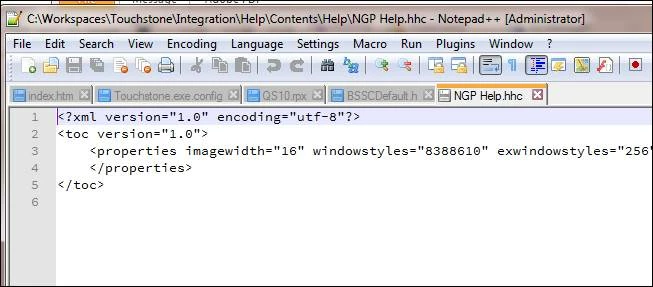
When I open the HHC file with Notepad, I only get the info shown in the following screen. There is nothing in the HHC about the books or the topics in the books. (I thought we used to be able to open the HHC in a text editor and verify the book/topic structure.)

Should I be concerned that the check-in date does not reflect the most recent check-ins?
Thanks.

Carol

This topic has been closed for replies.
Correct answer Willam van Weelden

This TOC is obviously empty, as you noted yourself as well. Just a sanity check: RoboHelp allows multiple TOC's. Are you looking at the correct TOC?

If RoboHelp is showing the TOC, try to check out all files, make a change to the TOC, check in all files. The TOC needs to be checked in separately and that only happens when you check in all. The check out is to make sure another colleague isn't in the way.

2 replies

Inspiring
December 22, 2015

Thanks so much, Willam. You nailed it!

Our original TOC was NGP_Help.hhc because the original product was called "NGP". Later, when the product had a  real name, "Touchstone", we renamed it to "Touchstone_Help.hhc". When I looked in Source Control, where everything is sorted alphabetically, I blanked on the fact that I was looking at the NGP TOC, not the Touchstone TOC.

Regards, and happy holidays.

Carol

Willam van Weelden
Willam van WeeldenCorrect answer
Inspiring
December 21, 2015

This TOC is obviously empty, as you noted yourself as well. Just a sanity check: RoboHelp allows multiple TOC's. Are you looking at the correct TOC?

If RoboHelp is showing the TOC, try to check out all files, make a change to the TOC, check in all files. The TOC needs to be checked in separately and that only happens when you check in all. The check out is to make sure another colleague isn't in the way.