Inspiring
November 6, 2024
Answered

How do I adjust the spacing between lines within a paragraph?

  • November 6, 2024
  • 2 replies
  • 362 views

2022.4.179


How do I adjust the leading of paragraphs? I can change the spacing above and below paragraphs by adjusting the Margins under LAYOUT. 


But I want to open up the spacing withnin a paragraph.


Thanks in advance!



    This topic has been closed for replies.
    Correct answer Peter Grainge

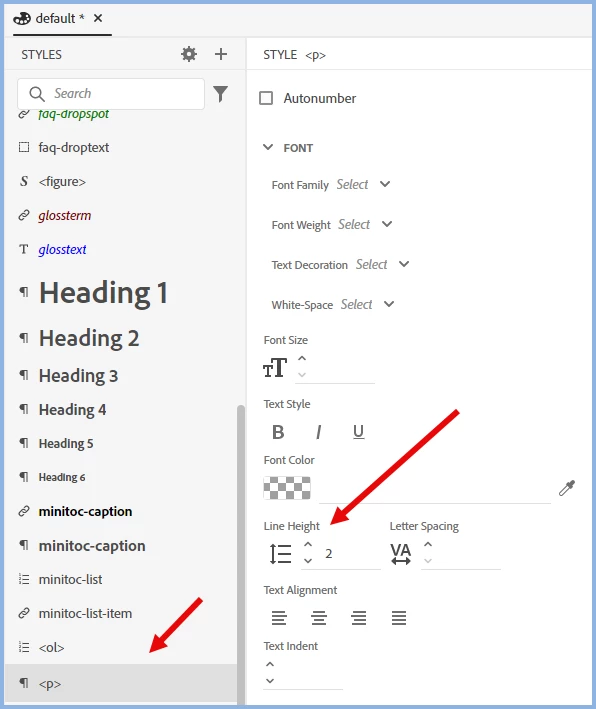
    Open the CSS in the CSS editor and adjust the line height for the style. To the right of what I have shown, you will see the spacing increase in the preview.


    ________________________________________________________

    My site www.grainge.org includes many free Authoring and RoboHelp resources that may be of help.


    2 replies

    Jeff_Coatsworth
    Community Expert
    Community Expert
    November 6, 2024

    I suspect that if you aren't presented with a control in the RH UI for line spacing, you'll have to modify the CSS of the style controlling that paragraph text.

    Peter Grainge
    Community Expert
    Peter GraingeCommunity ExpertCorrect answer
    Community Expert
    November 6, 2024

    Open the CSS in the CSS editor and adjust the line height for the style. To the right of what I have shown, you will see the spacing increase in the preview.


    ________________________________________________________

    My site www.grainge.org includes many free Authoring and RoboHelp resources that may be of help.


    Use menu (bottom right) to mark as Best Answer or to Highlight particularly useful replies. Found the answer elsewhere? Share it here.