
Inspiring
February 20, 2020
Answered

How do I change the color of Hide left Panel for Mobile in New RoboHelp UI?

  • February 20, 2020
  • 13 replies
  • 1087 views

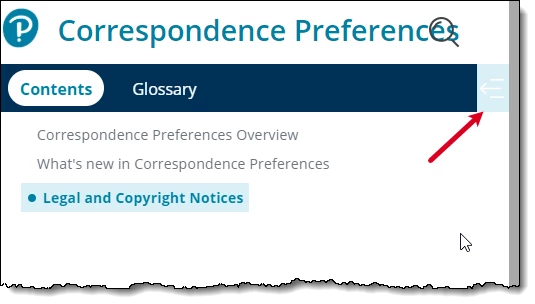
I am updating the Oceanic skin to match our corporate branding. I cannot find a way in the UI to change the color behind the Hide Left Panel icon. I need it to match the color of the rest of the menu bar. I can see the field in the underlying layoutDiff.css file, but I cannot change it there since any changes made in the UI overwrite manual changes to the layoutDiff.css file. I am modifying the skin as a template for other users that need to make modifications for their individual projects.
This topic has been closed for replies.
Correct answer Viky T

I logged a defect with Adobe RH-6644. They confirmed this is an issue and they will be fixing this in an upcoming release. Here is the work around until it is fixed.

As of now, you need to modify the background color of "Show" state button separately. Please download the custom CSS file from here: [https://documentcloud.adobe.com/link/track?uri=urn%3Aaaid%3Ascds%3AUS%3A31d12d18-3369-4c68-a927-0ba7d12c533f]. Open the custom.css and change the color from "blue" to the desired value. Now, go to Skin Editor: "Layout > User Assets > Add Asset" and browse the downloaded CSS. Save the skin and generate the Frameless Output. It should have same color in the output.

This customization option will be added to the skin editor in an upcoming patch.

13 replies

Viky TAuthor
Inspiring
February 21, 2020

It is a new Frameless skin that is available in the new version of 2019. I am only working with the Frameless skins, not the classic skins.

Peter Grainge
Community Expert
Community Expert
February 21, 2020

Content removed as there was confusion between the new Oceanic frameless skin that ships with 2019 and the Ocean skin that was deprecated in RoboHelp 2017 Update 2.


The information was not relevant to this thread.


Use the menu (bottom right) to mark the Best Answer or Highlight particularly useful replies. Found the answer elsewhere? Share it here.
Community Expert
February 21, 2020

Try Topic Page > Toolbar > toc-icon-div

Viky TAuthor
Inspiring
February 21, 2020

It's not working. I set that field. It works for Show left panel.

It does not work for Hide left panel. It does not even select the field in the UI.

Here's how it looks in generated help.