


roryj86911642
Inspiring
Feb 27, 2019 8:53 PM UTC
Answered

How do I connect images to topics so that the output folder includes has a complete help system?

I want to send my output folder to developers so that they can integrate my topics with the images. I saved my output folder to my desktop and when I clicked on the index.htm file, I got my help system with text only topics.
This topic is closed to new replies. Start a new post to keep the conversation going.
AmebrCorrect answer
Community Expert
Feb 28, 2019 12:06 AM UTC

Yes I have the latest version 2019.0.5.

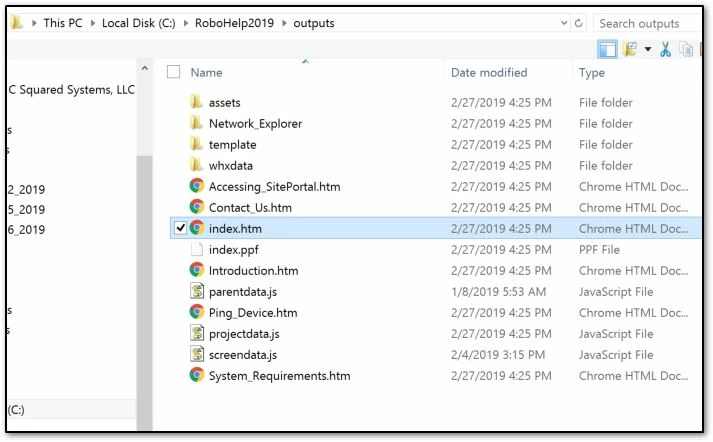
When I go outside of RoboHelp and go to the outputs folder from windows Explorer and click on a topic, yes the images show up.


That Images folder doesn't seem right. Is there an "images" folder within the "assets" folder that contains the images in your project?

I'm wondering if somehow you linked to images outside your project, which would explain why it works on your C drive, but not when you copy the output folder.

8 replies

Jeff_Coatsworth
Community Expert
Community Expert
Feb 27, 2019 8:59 PM UTC

Do they appear properly in the project? How are they referenced in the project? Do you have them located in an Images folder within the project or as Baggage files?

Translate
roryj86911642
Inspiring
Feb 27, 2019 9:14 PM UTC

They appear properly in the project. I have the images in an images folder located as C:\RoboHelp2019\Unified2\Images. I don't know what baggage files are.

Translate
Jeff_Coatsworth
Community Expert
Community Expert
Feb 27, 2019 9:29 PM UTC

You're using RH2019 (new style, not Classic?) - have you applied the latest patch? If you leave RH to set the output location, do the images show up then?

Translate