
Participant
September 18, 2013
Answered

How do I edit a module's existing skin (RH9)?

  • September 18, 2013
  • 4 replies
  • 931 views

I have RH9. I inherited a project. The skin for one module (Radiant) does not match the skins for other modules in the project (Example Hospital Help).
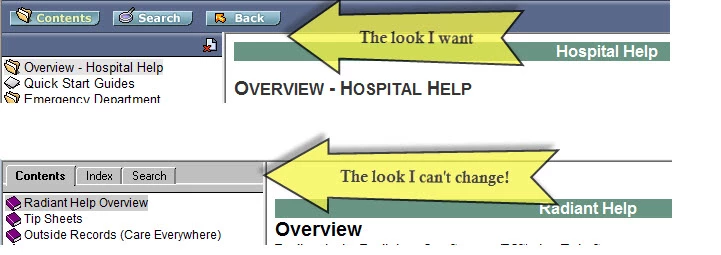
I tried to edit the skin, but it made no difference. I then copied the !SkinSubFolder! from Hospital to Radiant. It made no difference.

I don't know what to do next to get them to match.

Any help is greatly appreciated.

Vicki

This topic has been closed for replies.
Correct answer Captiv8r

Take a look at the video linked below for an example of what I'm expecting to see.


Click here to view

Cheers... Rick

4 replies

Participant
September 18, 2013

Thank you, thank you, thank you!!!!

You solved my problem!

Once I knew where the properties were and checked them, I saw that it was not pulling the correct skin.

Even thought I had it in the SKIN section, it was pulling the default.

Problem is solved.

I so appreciate your taking the time to help out a learner!

Vicki

Participant
September 18, 2013

I had all of 4 hours of training on RoboHelp.

I will do a Screenr, but let me know what I should capture.

From the Project Setup, the skin-just the one we are using?

From File: Project Settings?

Anything else?

Sorry for my lack of knowledge. I've been looking in the RoboHelp for the Web book, but can't find the answers I need!

I appreciate the help,

Vicki

Captiv8r
Captiv8rCorrect answer
Legend
September 18, 2013

Take a look at the video linked below for an example of what I'm expecting to see.


Click here to view

Cheers... Rick

Participant
September 18, 2013

One step further. I inherited this, I don't know what Section 508 is or how I disable it. Could you help Rick?

Captiv8r
Legend
September 18, 2013

Hello again

What might be helpful here would be if you could record a brief demonstration of walking through your settings. You could do that by using Screenr. ( http://www.screenr.com )

We could then view the settings and possibly tell you where things are going south.

Cheers... Rick

Captiv8r
Legend
September 18, 2013

Hi there

Have you enabled Section 508? If so, you get that unwanted look.

Cheers... Rick