Inspiring
December 11, 2025
Answered

How do I fix an RH2022 project renaming SNAFU?

  • December 11, 2025
  • 2 replies
  • 275 views

I was asked to re-name an RH2022 project, so I did: went to the directory, found the project and renamed it. However, now I get this:
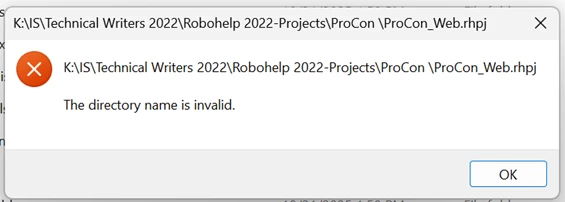
LonTheWriter_0-1765476594582.png

Any way I can make it valid?


Thanks!

    Correct answer Peter Grainge

    You must not rename the rhpj file outside of RoboHelp. Restore it in File Explorer to what it was. Double click it and then it should open.


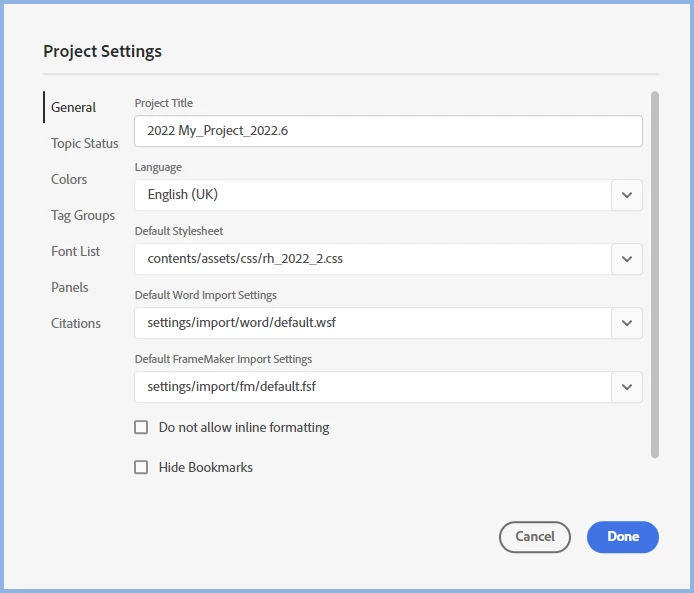
    With the project open, change the Project Title to what you want.


    image.png

    ________________________________________________________

    My site www.grainge.org includes many free Authoring and RoboHelp resources that may be of help.


    2 replies

    Peter Grainge
    Community Expert
    Peter GraingeCommunity ExpertCorrect answer
    Community Expert
    December 11, 2025

    You must not rename the rhpj file outside of RoboHelp. Restore it in File Explorer to what it was. Double click it and then it should open.


    With the project open, change the Project Title to what you want.


    image.png

    ________________________________________________________

    My site www.grainge.org includes many free Authoring and RoboHelp resources that may be of help.


    Use the menu (bottom right) to mark the Best Answer or Highlight particularly useful replies. Found the answer elsewhere? Share it here.
    Inspiring
    December 11, 2025

    Thanks once again, Peter, for saving the day!

    Peter Grainge
    Community Expert
    Community Expert
    December 11, 2025

    Put it back to what it was first. Then you should be able to open the project. Go to the File menu and change the project name there.

    ________________________________________________________

    My site www.grainge.org includes many free Authoring and RoboHelp resources that may be of help.


    Use the menu (bottom right) to mark the Best Answer or Highlight particularly useful replies. Found the answer elsewhere? Share it here.
    Inspiring
    December 11, 2025

    Hi, Peter!

    Thanks so much for the quick response. Okay, I renamed the file back to what it was, but when I tried to open it, I got that same error message.

    Inspiring
    December 11, 2025

    I just noticed that there is a space after the Project folder (ProCon ); when I delete that space, I get a message that says:

    "The source and destination filenames are the same."