

Community Expert
February 20, 2020
Question

How do I make a browse sequence continue from the end of a chapter to the top of next chapter
  • February 20, 2020
  • 8 replies
  • 674 views

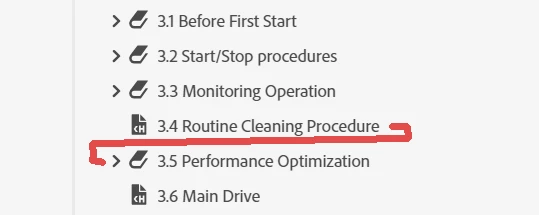
I have a RoboHelp 2019 project with a book with multiple chapters consisting of individual topics. The Table of contents is based on the table of contents from the framemaker book file it has been imported from. The image shows the table of contents in RoboHelp. I have added a browsing sequence which takes all the topics and puts them after one another, and that works. When I generate the html the browsing sequence works as expected within each chapter. Only problem is... when one has reached the end of a chapter, one has to navigate bach to the menu and begin a new browsing sequence with that chapter. I would like the sequence to go seamlessly from chapter to chapter. Can that be done and how?

This topic has been closed for replies.

8 replies

Peter Grainge
Community Expert
Community Expert
February 20, 2020

Using File Explorer locate in the output one of the topics where the browse sequence sticks. Open that topic in a text editor. You should find a line something like this.


<meta name="brsnext" value="sometopic.htm"/>


"sometopic.htm" should be the name of the next topic in the browse sequence.


  1. What does the line read in the topic where your sequence freezes?
  2. Is there some other line that you think might affect what is happening?


Use the menu (bottom right) to mark the Best Answer or Highlight particularly useful replies. Found the answer elsewhere? Share it here.
Community Expert
February 20, 2020

Hi Jeff. Thanks for replying! I have screendumped the view from the TOC and the Sequence here. I would like the browse sequence to continue from "NALL3901-EN0" to "NALL4001-EN0" in the published html output. I do define both the toc and the sequence when I set up the publishing profile.

Bjørn Smalbro - FrameMaker.dk
Jeff_Coatsworth
Community Expert
Community Expert
February 20, 2020

So using your TOC example, what topic file is the last one in 3.4 and the first in 3.5? Are they shown in your sequence? We can't tell because we don't know what each of them are..

Community Expert
February 20, 2020

The sequence is merely a list of html files in the order they are supposed to be browsed.

Bjørn Smalbro - FrameMaker.dk
Peter Grainge
Community Expert
Community Expert
February 20, 2020

When you click on browse sequence extreme left, are you seeing one sequence or one for each chapter?


Use the menu (bottom right) to mark the Best Answer or Highlight particularly useful replies. Found the answer elsewhere? Share it here.
Erwin.Timmerman
Inspiring
February 20, 2020

Do you have any topics listed twice in your toc? For example, if a book icon has a topic, and the same topic is also listed separately, the browse sequence will jump to the first listing of that topic, making some kind of endless loop because you jump back all the time.

Community Expert
February 20, 2020

Hi Peter. Thanks for your quick answer. I  have created the browse sequence by dragging the files from the content panel to the sequence panel and reordered them according to the sequence i wanted. The sequences work allright in each book. But one cannot use the sequence buttons to navigate from the last page of one book/chapter to the first page of the next book/chapter.

Bjørn Smalbro - FrameMaker.dk
Peter Grainge
Community Expert
Community Expert
February 20, 2020

The browse sequence only contains what you drag to it and you can only add topics. How did you create the browse sequence?


Use the menu (bottom right) to mark the Best Answer or Highlight particularly useful replies. Found the answer elsewhere? Share it here.