
Inspiring
April 9, 2015
Answered

How Do I Package My HTML Output

  • April 9, 2015
  • 1 reply
  • 523 views

Hi,

I am using TCS 5, RH 11, FM 12, all patched up. I want HTML files, baggage (PNG, etc.), and a single CSS packaged so I can deploy it (on CD or online) in a useable way. Am currently using a Blank project with HTML 5 output.


However, currently, each of my 31 or so FM chapters gets a folder that contains an HTM, CSS, baggage, and a TXT file.
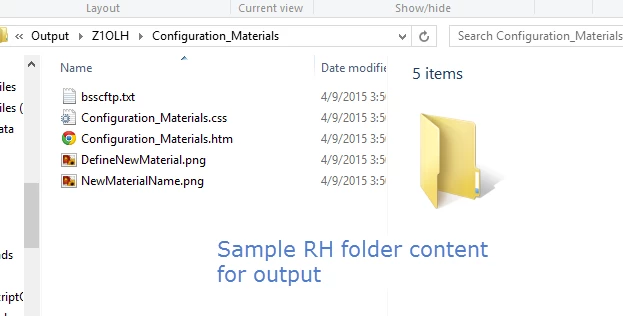

  • I have 31 such folders. this is unhelpful. Can I get all my HTML in one place, with a SINGLE subfolder for all baggage, and ONE CSS?
  • I tried Saving and Generating, but that didn't work.
  • I set a publish location as a folder on my hard drive, called Output, and that didn't work.


The structure I want is:

  • All the HTML files in one folder (with the CSS)
    • A sub folder for the CSS (optional if not in the same folder as the HTML)
    • A sub folder with all the graphics


How do I achieve this?


Thanks,


Sean


This topic has been closed for replies.
Correct answer Jeff_Coatsworth

So when you generate the help, your output usually goes into a \!SSL!\ folder named with whatever flavour of help you create – you can package up that entire folder for distribution. It could be zipped up or you could use some third-party software to compress it and create a self-extracting executable. Some companies then hand over the output folder to their developers to be included in the software build – every place is different.

1 reply

Jeff_Coatsworth
Community Expert
Jeff_CoatsworthCommunity ExpertCorrect answer
Community Expert
April 13, 2015

So when you generate the help, your output usually goes into a \!SSL!\ folder named with whatever flavour of help you create – you can package up that entire folder for distribution. It could be zipped up or you could use some third-party software to compress it and create a self-extracting executable. Some companies then hand over the output folder to their developers to be included in the software build – every place is different.

Seanb_usAuthor
Inspiring
April 14, 2015

Thanks. Is there any way to control how this content is structured? For example, I want all the HTML files in one folder, while currently RH places them in a separate folder based on the FM file they came from.

Cheers,

Sean