
Participant
November 25, 2014
Answered

How do I remove a duplicate browse sequence from HTML help created with RoboHelp 8?

  • November 25, 2014
  • 2 replies
  • 310 views

One of my projects in a merged projects is showing two browse sequences in the merged system.  I've tried deleting the project from the merged system, recompiling, checking that the browse sequence doesn't appear in the merged system, then adding back the project.  The duplicate browse sequence appears again.  I've also checked the individual project and there is no duplicate browse sequence when I view iit.  Any ideas?
This topic has been closed for replies.
Correct answer jenesei

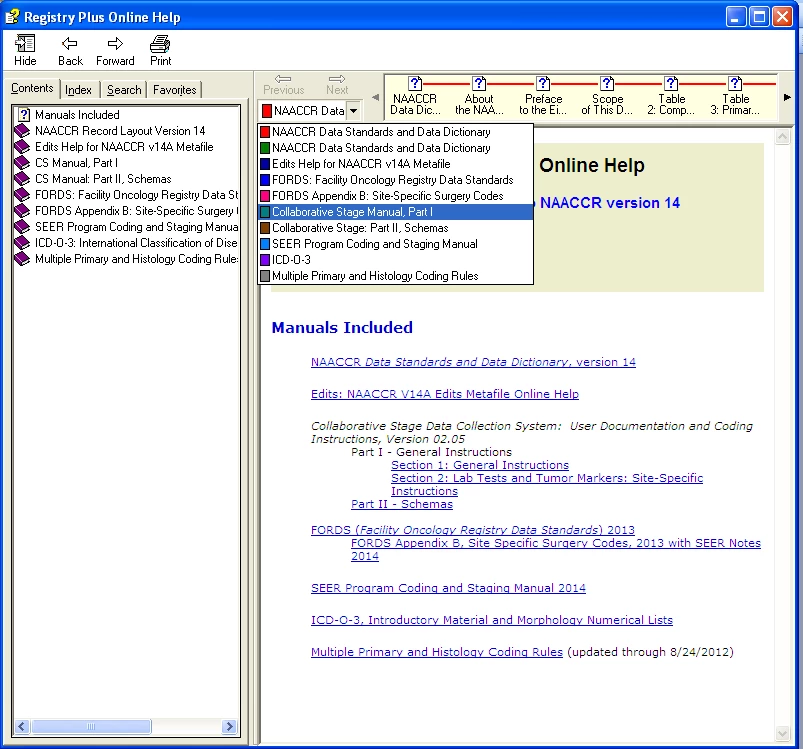
Screen shot below.  Note that the browse sequence for NAACCR Data Standards and Data Dictionary is duplicated in the drop down.  A colleague helped me fix this by opening the .hhp file in Notepad and deleting a second entry under [MERGE FILES] for that component of the merged project.  This problem apparently happens when a merged project is copied and modified.  The .hhp file can end up with two entries for a component, one with a full path and one without.  I deleted the duplicate with the full path, recompiled, and the duplicate browse sequence disappeared.

Thanks for trying to help.

2 replies

jeneseiAuthor
Participant
November 26, 2014

Screen shot below.  Note that the browse sequence for NAACCR Data Standards and Data Dictionary is duplicated in the drop down.  A colleague helped me fix this by opening the .hhp file in Notepad and deleting a second entry under [MERGE FILES] for that component of the merged project.  This problem apparently happens when a merged project is copied and modified.  The .hhp file can end up with two entries for a component, one with a full path and one without.  I deleted the duplicate with the full path, recompiled, and the duplicate browse sequence disappeared.

Thanks for trying to help.

Captiv8r
Legend
November 25, 2014

Hi there

A screen capture would help here. I'm wondering if you are referring to Breadcrumbs as opposed to Browse Sequences.

Here is breadcrumbs:

If that's the case, you likely have them enabled in the Single Source Layout recipe as well as in a Master Page. So you will need to turn them off in one of the places.

If that's not what you are seeing, please share a screen capture to clarify.

Cheers... Rick

Jeff_Coatsworth
Community Expert
Community Expert
November 25, 2014

That was what I was thinking too – I’ve never heard of duplicate Browse Sequences

Captiv8r
Legend
November 25, 2014

Yep, you can have duplicate browse sequences. Each sequence is simply a list of topics. They both cannot have the same name, of course, but they can be duplicates.

Cheers... Rick