
Gravenstein
Inspiring
June 24, 2015
Answered

How do I save my workspace in RH2015?

  • June 24, 2015
  • 1 reply
  • 469 views

I am working in RoboHelp HTML 2015 (trial version). RH isn't saving the state of my workspace--pod layout, view settings, etc. In Options/General, I have Remember Project State selected, and I don't see anywhere else to save my settings. Am I missing something?

Thanks,

G
This topic has been closed for replies.
Correct answer Captiv8r

Hi there

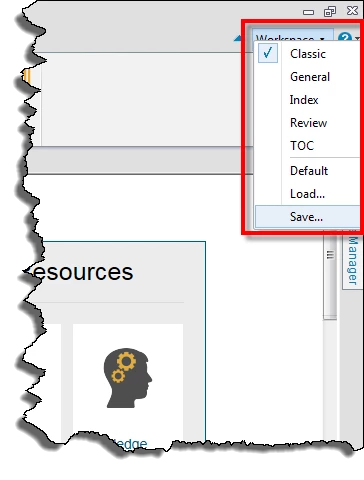
Look in the upper right corner of RoboHelp. There you should see "Workspace". Click it and save from there?

Cheers... Rick

1 reply

Captiv8r
Captiv8rCorrect answer
Legend
June 24, 2015

Hi there

Look in the upper right corner of RoboHelp. There you should see "Workspace". Click it and save from there?

Cheers... Rick

Gravenstein
Inspiring
June 24, 2015

That's it! Thanks, Rick. For some reason, I'm unable to access the RH help right now, so I especially appreciate such a quick answer.

Cheers,

G