JenniR_12
Inspiring
March 25, 2024
Answered

how do i set before and after paragraph spacing in Robohelp 2022

  • March 25, 2024
  • 4 replies
  • 684 views

I'm simply trying to set before and after paragraph spacing to a style that I'm trying to create in RH 2022.  Can someone point me in the right direction?  I don't seem to be finding much online about this?  I am new to Robohelp but I have found information regarding how to do this in Classic version.  Please help.  

    This topic has been closed for replies.
    Correct answer Peter Grainge

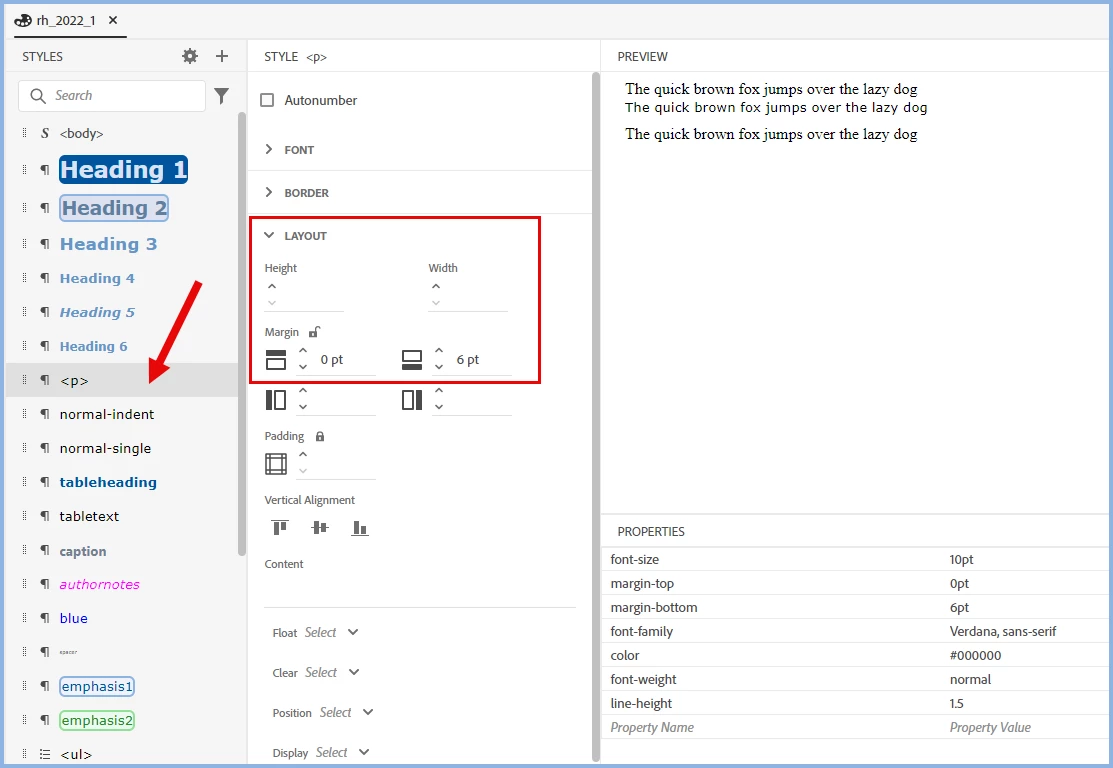
    Sorry for having misread your question. You can do what asked. You just need use the css editor. Here I have shown how to add extra spacing after but I could also have added spacing before. I have used point units of measurement but you can use any valid unit such as pixels.


    See the link to my site below. You will find lots of information about 2022 there. Start at RH2022 About Adobe RoboHelp (grainge.org)


    Classic may look easier but once you get used to the new UI, it is easier. I hate going back to Classic.

    ________________________________________________________

    My site www.grainge.org includes many free Authoring and RoboHelp resources that may be of help.


    4 replies

    Community Expert
    March 25, 2024

    I would also recommend going through some of the CSS tutorial on W3schools to get used to the terminology. Adobe has (mostly) used the css terms for their stylesheets. As it's a different paradigm to Word, being familiar with how it works in code can help you figure out what to look at in Robohelp too.

    JenniR_12
    JenniR_12Author
    Inspiring
    April 3, 2024

    Thank you.  Very helpful.  I took a day and took some of the tutorials on W3schools.  It was hepful.  

    Jennifer Rogers
    Peter Grainge
    Community Expert
    Peter GraingeCommunity ExpertCorrect answer
    Community Expert
    March 25, 2024

    Sorry for having misread your question. You can do what asked. You just need use the css editor. Here I have shown how to add extra spacing after but I could also have added spacing before. I have used point units of measurement but you can use any valid unit such as pixels.


    See the link to my site below. You will find lots of information about 2022 there. Start at RH2022 About Adobe RoboHelp (grainge.org)


    Classic may look easier but once you get used to the new UI, it is easier. I hate going back to Classic.

    ________________________________________________________

    My site www.grainge.org includes many free Authoring and RoboHelp resources that may be of help.


    Use menu (bottom right) to mark as Best Answer or to Highlight particularly useful replies. Found the answer elsewhere? Share it here.

    JenniR_12
    JenniR_12Author
    Inspiring
    March 25, 2024

    Ahhh.  Well, I feel kind of silly now.  I was looking for the words Before and After.  Thank you for getting me to the right place as I was not making that connection (obviously).  I appreciate the help.  I have your website bookmarked and I look at it multiple times a day. 

    Jennifer Rogers
    Jeff_Coatsworth
    Community Expert
    Community Expert
    March 25, 2024
    Peter Grainge
    Community Expert
    Community Expert
    March 25, 2024

    Question misread. Content of this post removed.

    ________________________________________________________

    My site www.grainge.org includes many free Authoring and RoboHelp resources that may be of help.


    Use menu (bottom right) to mark as Best Answer or to Highlight particularly useful replies. Found the answer elsewhere? Share it here.

    JenniR_12
    JenniR_12Author
    Inspiring
    March 25, 2024

    I don't have a great background in html (haven't really had to until now, but I can write macros in Word, so I'm familiar enough the concept).  How does output know how to space between paragraphs (it has to be following some "rule" or guideline, I would think?  What's the conversion chart?  In other words, If I am wanting 14 pt before and 14 pt after, what is the number (if that question makes any sense).  I'm assuming I would need to add a line of code of some sort into the css for said style.  That's how I would get a macro in Word to behave a certain way (using vba editor, I would make the change or add a line of code saying what I needed it to do.  I may be completely off, though.  I don't even think I know what I know anymore.  The Classic version seemed to be much eaiser to understand (maybe lower level stuff vs what I find to be really inefficient and harder than necessary in the new UI).  Thank you for answering my 1st question, though, as to whether it can be done or not.

    Jennifer Rogers
