
Sleant
Inspiring
March 9, 2020
Question

How do YOU create your "Back to Top"?

  • March 9, 2020
  • 5 replies
  • 706 views

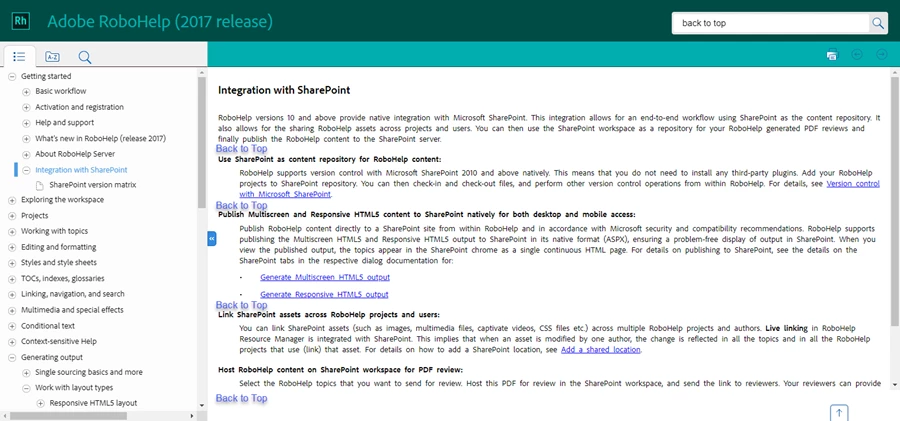
I was wondering how folks in our RH community create your best way of "Back to Top" feature. I would like to efficiently create a "Back to Top" link in multiple places on my usually very long topic, so user are used to seeing Back to Top link when they start scrolling down the topic. Example screenshot below. Thank you, all.

(using RH2017 screen as an mockup/example)
    This topic has been closed for replies.

    5 replies

    Community Expert
    March 24, 2020

    If you want a back to top link every few lines, you'll need to add those links manually where you want them.  As a personal preference, I wouldn't create links all over the page, but would rely on the single built-in back to top button I mention in my previous post. It's always visible and not hard for users to access. My other post describes how to change it from an icon to readable text.


    It should be possible to use a snippet, if you're set on adding links everywhere, to save a bit of time. Assuming you only want to jump to the top of the page, of course. 


    Another time saver could be the trick of using a '#' as the href works in your output. In the past, if you specified just '#' as the href, the link would jump to the top of the page. You'd have to check if it works in your output, and obviously would only be relevant if you are wanting to jump to the top of the page every time.


    Sleant
    SleantAuthor
    Inspiring
    April 7, 2020

    Amebr - Thank you so much as always. As soon as I have time, I will try it right away. Thank you again.

    Community Expert
    March 11, 2020

    Oh, I forgot to add that you only need "background-image: none;" line if you need to target IE11. The 'unset' version works for everything else.

    Sleant
    SleantAuthor
    Inspiring
    March 24, 2020

    I'm so sorry, Amebr and Peter. I think I'm not explaining this well. What I have done when my topics get so long is to insert a Back to Top hyperlink every 3-5 long paragraphs (or when I think the screen has to start to vertical scroll) using a Bookmark feature. My question is, is Bookmark the best solution? Or is there something in RH 2019 that's canned/generic/basic feature/etc. that I am missing? Thank you so much again, Amebr and Peter.

    Community Expert
    March 10, 2020

    If you wanted to change the existing back to top button to text, rather than a cryptic image, you could add this as a custom css file in your skin's User Assets section:


    This is based on making it approximately match Azure Blue in RH2019 New, so you could adjust fonts, colours, sizes etc to your liking.


    Pasting this code into the RH2019 Classic layout.css file also works, so it might work for RH2017 as well, but I haven't tried it.


    body.media-desktop div.topic a.to_top {
    background-image: none;
    background-image: unset;
    width: auto;
    border-top: 1px solid rgb(14,92,166);
    border-left: 1px solid rgb(14,92,166);
    border-right: 1px solid rgb(14,92,166);
    border-radius: 10px 10px 0 0;
    padding: 5px;
    font-size: 0.5rem;
    }
    div.topic a.to_top:before {
    content: "Back to top";
    font-size: 0.8rem;
    font-family: Arial;
    color: rgb(14,92,166);
    text-decoration: underline;
    }


    Sleant
    SleantAuthor
    Inspiring
    March 11, 2020

    Thank you so much, Peter and Amebr. I will try both suggestions as soon as I have time. Will report back my result.

    Peter Grainge
    Community Expert
    Community Expert
    March 10, 2020
    Use the menu (bottom right) to mark the Best Answer or Highlight particularly useful replies. Found the answer elsewhere? Share it here.
    Peter Grainge
    Community Expert
    Community Expert
    March 10, 2020

    Only Adobe can answer how they did it and this is mainly a user to user forum.


    I recalled an old post by someone who frequented these forums many years ago. He posted a solution where I believe the link scrolls better than some solutions. Read this thread and in particular the solution from MergeThis.


    Use the menu (bottom right) to mark the Best Answer or Highlight particularly useful replies. Found the answer elsewhere? Share it here.