
Known Participant
June 30, 2014
Answered

How does one apply bulleted lists in RH10

  • June 30, 2014
  • 1 reply
  • 436 views

Hi,

I am totally struggling to understand the workflow for applying bulleted lists in RH10 (for html).

If I have a paragraph style=Normal, font=Tahoma-10pt, why on earth does selecting that paragraph and clicking the bulleted list button in the Formatting toolbar add a bullet but also set style to None?

I have clearly missed something here.

But this being the "normal" workflow for applying bullets, if one is required to hack into the css etc to sort this out, this suggests a horribly unfriendly interface to me.

Could someone please spell out in simple English how this is supposed to work?

Incidentally I have just spent a considerable amount of time sifting through both the RH10 user guide and forum topics, and I still don't get it.

Therefore my apologies if I'm being stupid.
This topic has been closed for replies.
Correct answer Captiv8r

Yeah, it gets weird using the RoboHelp CSS editor.

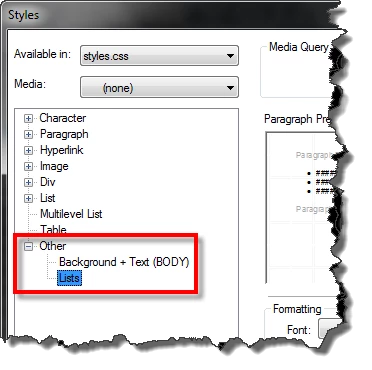
Try defining the style with the tree expanded as shown below:

Cheers... Rick

1 reply

Captiv8r
Legend
June 30, 2014

Hi there

I think the problem here is that no style has actually been defined for the bullets. In CSS, these are known as UL (Unordered List) and OL (Ordered LIst) tags. Likely, because RoboHelp has been made more HTML compliant, we now have to take an extra step to specifically define the font characteristics for the UL and OL tags in the CSS. Either that or just remember to apply Normal styling once you do a list. Ctrl+Shift+N should do it.

Cheers... Rick

TA_AndyAuthor
Known Participant
June 30, 2014

Hello Rick,

Many thanks for the swifty response.

Right - if I have understood correctly, I created an UL style thus:

If I now try to apply a bullet via the button in the Formatting toolbar, I get the same result as before (ie style = None etc),
but if I apply my new UL style via the Styles and Formatting pod, it works.

So progress of sorts, but I remain in a confused and frustrated state.

Cheers,

A

Captiv8r
Captiv8rCorrect answer
Legend
June 30, 2014

Yeah, it gets weird using the RoboHelp CSS editor.

Try defining the style with the tree expanded as shown below:

Cheers... Rick