


Participating Frequently
March 17, 2021
Question

How many folders can you add to the Author>Contents panel?

  • March 17, 2021
  • 14 replies
  • 224 views

Have many Word documents that I'll be adding to a brand new project (RH2020.3.32). 

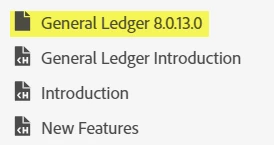
Added seven (7) folders for various company software modules. Ran into a problem when I added the 8th folder for a General Ledger Word document and started adding topics to that folder...the "folder" seemed to be a section. I could not view the the two topics I added from the Author>Contents panel. When I located the files in Explorer, I could view the General Ledger folder and the two topics that were added. Is the way RH is meant to work?

Any recommendations or workarounds?

Ideally, I'd like to keep everything organized as I'm also learning both RH again as well as the company software, and I'd like to have a folder for each Word document to stay organized. I may need 30 or more folders. Is that possible? 
 

[image added by moderator - please use image icon in web interface instead of attachments]

This topic has been closed for replies.

14 replies

VeronicaJAuthor
Participating Frequently
March 17, 2021

The topics below are not in that folder as they would be indented if they were. Are those the topics that should be in the folder or are we talking about other topics? There are two other topics in the highlighted General Ledger folder. There's no arrow to open that folder and view the topics.

Even when I drag topics into this General Ledger folder, I cannot view any of those topics from the Control panel. Therefore, I took the General Ledger Introduction back out of the folder so that I could easily view it and work with it.


If those are the topics, then drag them over the folder. Otherwise what is missing? From the Control panel, I cannot easily view and work with any topics in this folder. Also, I cannot create subfolders under this folder. When I attempt to create other new folders, I get the same result as this General Ledger "folder".  

Ideally, it'd be great if all folders to function as in the following image:


Peter Grainge
Community Expert
Community Expert
March 17, 2021

I missed seeing the image as you attached it rather than putting it in the content.


You are showing a folder called General Ledger 8.0.13.0.


The topics below are not in that folder as they would be indented if they were. Are those the topics that should be in the folder or are we talking about other topics?


If those are the topics, then drag them over the folder. Otherwise what is missing?

________________________________________________________
See www.grainge.org for free Authoring and RoboHelp Information

Use the menu (bottom right) to mark the Best Answer or Highlight particularly useful replies. Found the answer elsewhere? Share it here.
VeronicaJAuthor
Participating Frequently
March 17, 2021

Sections is a term related to the TOC rather than the Contents panel. Understood. Wasn't sure what else to call it. Is there another name I should use? I also included an image with the "folder" highlighted.


Are you definitely looking in the Contents panel for the topics you see in File Explorer? Yes, absolutely. If you notice in the image, the "folder" doesn't have an arrow next to it like other true folders do. I've included the image again, and this is a screenshot from the Contents panel.

[please use image icon in web interface instead of attachments]

Peter Grainge
Community Expert
Community Expert
March 17, 2021

You can have as many folders in the Contents panel as you want. Sections is a term related to the TOC rather than the Contents panel. However, again you can have as many sections as you want.


Are you definitely looking in the Contents panel for the topics you see in File Explorer?

________________________________________________________
See www.grainge.org for free Authoring and RoboHelp Information

Use the menu (bottom right) to mark the Best Answer or Highlight particularly useful replies. Found the answer elsewhere? Share it here.