


Inspiring
January 12, 2023
Answered

How to add a custom button to copy URL to clipboard?

  • January 12, 2023
  • 4 replies
  • 465 views

I'm using RH2020, frameless output.

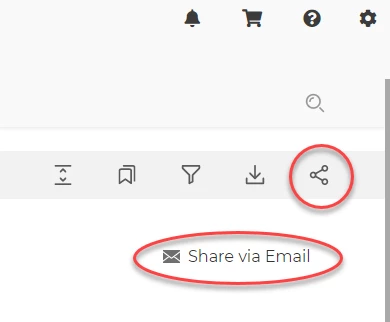
How do you add a button to the row of topic page buttons that copies the URL of the current topic to your clipboard? Right now, I've got the out-of-box functionality working where you click the Share button, and the share panel appears with an option to share via email. Sharing via email opens your email provider in a separate browser with the link to the topic pre-populated in an email draft.


However, our customer support team wouldn't just share using an email - their responses need to be sent through our ticketing system. All I really want is for them to click the Share button, and for the link to be copied to their clipboard instead so that they can paste it into their response in a ticket.


How do I make that happen? Thanks in advance!


    This topic has been closed for replies.
    Correct answer Amebr

    This may help if you have a developer handy.  https://community.adobe.com/t5/robohelp-discussions/add-custom-quot-topic-page-button-quot-to-exit-close-help/m-p/13388860


     tl;dr Put a # in the URL field and include a javascript file in the skin that listens for a click event.

    4 replies

    Community Expert
    January 19, 2023

    I think the easiest would be to give them access to the generated output with instructions on where the button is located. They should be able to look at the html code and figure out how to code the event handler from there. The css you posted here wouldn't hurt as that will ensure they can identify the correct button in the output based on the class name.

    AmebrCommunity ExpertCorrect answer
    Community Expert
    January 15, 2023

    This may help if you have a developer handy.  https://community.adobe.com/t5/robohelp-discussions/add-custom-quot-topic-page-button-quot-to-exit-close-help/m-p/13388860


     tl;dr Put a # in the URL field and include a javascript file in the skin that listens for a click event.

    Inspiring
    January 19, 2023

    Thank you! Do you know how the custom button would be called in the js? (Not looking for the full javascript - I have a developer to help me with that - but I'm not sure what to give him in terms of making it work with my button.

    So, the button in the skin is as follows:

            <custom_buttonsitem>
              <name>Share</name>
              <tabId>Share</tabId>
              <title>Share</title>
              <image>share.svg</image>
              <id>6</id>
              <key>2573</key>
              <href>#</href>
            </custom_buttonsitem>

    And the button in the layoutDiff.css is:

      .RH-LAYOUT-TOOLBAR-button-6 {
        font-weight: 700;
        font-size: 0.875rem;
      }  
      .RH-LAYOUT-TOOLBAR-button-6-applied {
      }
      .RH-LAYOUT-TOOLBAR-button-6 .RH-LAYOUT-TOOLBAR-button-icon {
        background-image: url('share.svg');;
      }
      .RH-LAYOUT-TOOLBAR-button-6 .RH-LAYOUT-TOOLBAR-button-icon-applied {
      background-image: url('share.svg');;
      }

    What do I need to give him for the js to 'hear' a button click?

    timf33396648
    Known Participant
    January 12, 2023

    Hi Thea,


    I had this exact need last week, and couldn't get it to go. I couldn't work out a way to add javascript to a new sharing option - there are only fields for Title, URL and Tooltip.


    My quick solution was to modify my topic template to include a script to copy the URL, and added it as a link in the template. It's absolutely not ideal, but on each page there's a link (but could be styled as a button) to copy the currect URL to the user's clipboard. I'm really keen to see if there's a solution to do exactly what you've asked because I'd like that option too!


    Best regards,

    Tim

    Jeff_Coatsworth
    Community Expert
    Community Expert
    January 12, 2023

    IIRC there's a scripting solution that will capture the URL of the page you're on and stick it in the subject (or body) of the mailto: link it creates. But I have no idea what it looks like - hunt around in the forum or on Stack Overflow for some ideas.