
Known Participant
December 6, 2010
Answered

How to browse using the TOC order using prev. and next buttons

  • December 6, 2010
  • 1 reply
  • 810 views

Hello

I'm looking for a Previous Page / Next Page buttons that use rather the TOC order to navigate than the History List.

Currently, the project shows Previous Page / Next Page buttons. But these buttons works only if the pages have been visited.

Do you think, It does exist? If Yes, it would work for HTML HELP Project, generated with RH8. I think javascript or HTLM could work for these functions.

thank for helping me.

Christophe GONZALEZ
This topic has been closed for replies.
Correct answer Willam van Weelden

Hi

I register the HHActiveX.DLL + copy/paste it on the folder of my CHM as said here: http://help.adobe.com/en_US/RoboHelp/RoboHTML/7.0/Distribution/Registering_HHActiveX.DLL.htm.

I create the browsing sequence in RH8 as Rick said (... "enter Zero ( 0 ) for the level value").

But It doesn't work, the Microsoft HTML Help does not show any buttons to navigate from one topic to another.

Bye


Hi,

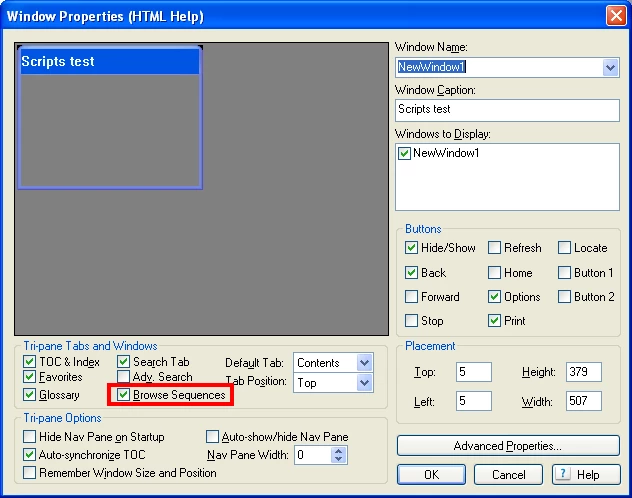
Does your window have the browse sequences?

Greet,

Willam

1 reply

Willam van Weelden
Inspiring
December 6, 2010

Hi,

You're looking for Browse Sequences. You can create custom sequences, but you can also generate sequences based on the TOC.

Tools > Browse Sequence Editor.

Greet,

Willam

Known Participant
December 6, 2010

Thanks for your reply, but the browse navigation works for the Webhelp format but doesn't work for Microsoft HTML Help.

How can I do the same navigation in a Microsoft HTML Help format?

is it possible?

thanks

Willam van Weelden
Inspiring
December 6, 2010

Hi,

  1. In your window definition, you need to select Browse Sequences.
  2. The Adobe dll 'HHActiveX.dll' should be installed on the system to show the browse sequences. You need to provide this file with your application if you want to use browse sequences in CHM. The file is in: %RH install dir%\RoboHTML

Greet,

Willam