
Known Participant
April 13, 2016
Question

How to change name that appears at the Upper-Left-Corner on Title Bar in CSH?

  • April 13, 2016
  • 1 reply
  • 495 views

Hi,

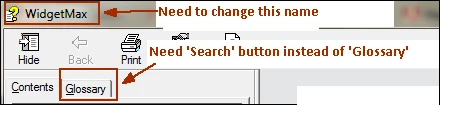
Is it possible to change the name that appears on the upper left corner of the CSH output? See the screenshots for reference.

One more question - Can you guide me how to show "Search" button instead of "Glossary". By default Glossary button is displayed in the CHM output. Instead, I want Search button.
Regards,

Prashant

This topic has been closed for replies.

1 reply

Captiv8r
Legend
April 13, 2016

Hi there

For the name in the title bar, you need to open the Outputs (SSL) pod and edit the properties of the window.

For the Glossary tab, I think that was an issue with the first release of RoboHelp. You should try updating RoboHelp and see if the issue disappears.

Cheers... Rick

Known Participant
April 15, 2016

Hi Rick,

The issue is resolved. Thanks.

Regards,

Prashant