


Inspiring
August 5, 2025
Question

how to change naming convention of microcontent phrases in frameless output

  • August 5, 2025
  • 2 replies
  • 130 views

We are currently developing a new online help system in frameless format and would like to include microcontent to provide better answers to user questions. We have defined the microcontent and integrated it correctly into the output.
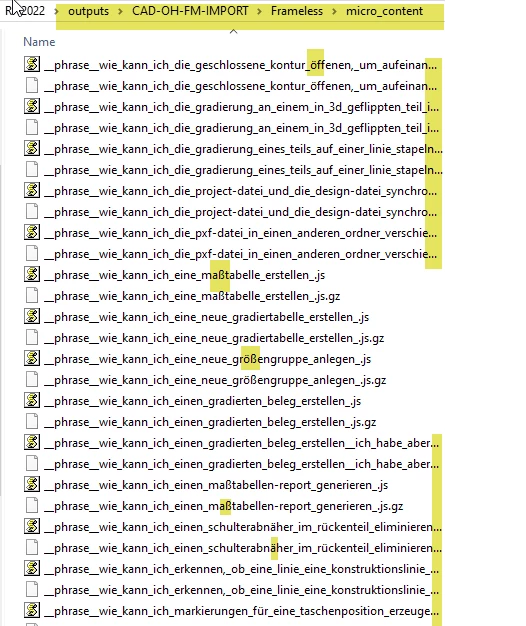
The problem starts when we install the project locally and the installation procedure rejects the naming conventions of the microcontent phrases, which means that the project cannot be used.
There are two errors: names that are too long and special characters. Is there a way to rename the phrases? Or how can I name microcontent using the group name + a sequential number? How do you solve this?
    2 replies

    Jeff_Coatsworth
    Community Expert
    Community Expert
    August 5, 2025

    This sounds more like an issue with the installer your software is using than the RH output itself being the issue... Does it work if you manually copy the output to the local destination? If so, have you tried just zipping it up into a self-extracting exe file using something like WinRAR?

    A-BelAuthor
    Inspiring
    September 15, 2025

    I'm just getting back to this issue now. We did indeed have to analyze the problem in more detail first. And in some places, the installation procedure could be improved. But that is very complex and extensive. If there are problems, the data always has to be adjusted first...

    The umlauts were not a problem. There were two other problems:

    1. Several topics had special characters in the heading (m- and n-spaces and guillemets, which were imported from FM and cause errors in Robohelp headings. There were no problems in the headings, but when the headings became file names, it was problematic.

    The replacement character > also caused problems. This led us to set the file names to Filename+Number during import.

    Unfortunately, in the frameless output, the use of breadcrumbs is no longer consistent due to the different file names (file names are displayed in the header instead of the heading, but that's just a side note). Fixed.-

    2. In the microcontent, only the long file names (we had formulated very specific questions) were a problem. Here, too, we would be grateful to have a way to define the file names differently (using the group name+number). That would solve all the problems.

    Our workaround is to check the length of the intent quetstions using a script and shorten them to 100 characters where necessary. However, depending on the installation method and directory length, this can also lead to problems. Could someone tell me how microcontent file names can be renamed?


    I hope I have made myself clear. Thanks.


    Jeff_Coatsworth
    Community Expert
    Community Expert
    September 15, 2025

    I just skimmed Peter's site for Microcontent and I don't see any mention of the file names. If you manually create one of the same intents and answers, do you end up with the same issue of long file names?

    A-BelAuthor
    Inspiring
    August 5, 2025

    To specify the errors more precisely. Our installation procedure expects ASCII-compliant characters.