
Known Participant
February 8, 2018
Question

how to change the position of back button that comes on Indigo screen layout main screen as per the toc created.

  • February 8, 2018
  • 1 reply
  • 559 views

Hi All,

I need to change the position of back button that comes on indigo layout as per of the TOC created while documentation process in Robohelp.

I have created a book under which i have created two more book and in each i have created topics like this:
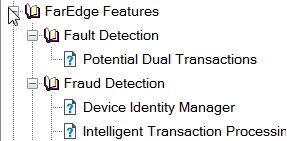
For which a layout is generated in indigo layout output:
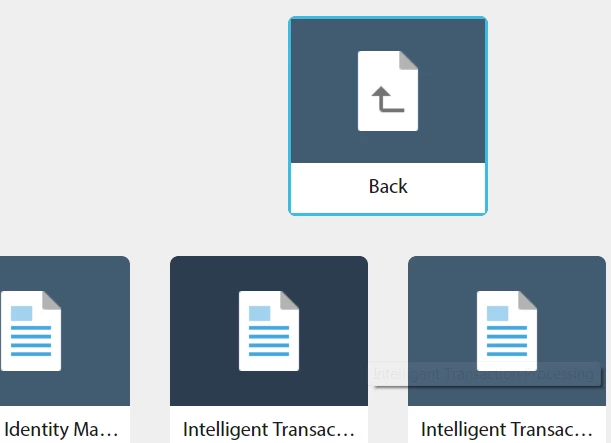
But i want that the back button as shown above should come after the topic names.

Please help how can i change the position of this back button.

Regards,

Richa Arora

This topic has been closed for replies.

1 reply

Peter Grainge
Community Expert
Community Expert
February 8, 2018

Good luck with that one. In the original Indigo layout, the Back button was the first in the first row of books. It was moved for some technical reason and I have made the point to Adobe that it wastes screen space.

I imagine it can be done by someone with expert knowledge of CSS but I cannot help you with that. It might be worth logging a feature request. Please follow this link to report bugs and request features. The more people who do so, the higher it gets prioritised.

https://tracker.adobe.com

Post the link to that request in this thread and others can vote for it.


See www.grainge.org for free RoboHelp and Authoring information.

@petergrainge

Use the menu (bottom right) to mark the Best Answer or Highlight particularly useful replies. Found the answer elsewhere? Share it here.
Known Participant
February 8, 2018

Hi Peter,

Thanks i am trying to post it in bug but it s showing request failed, same i tried in request feature, it is also showing request failed.

Regards,

Richa Arora

Known Participant
February 8, 2018

Hi All,

The issue has been successfully created plz vote for the issue, the issue id is: Tracker