Participating Frequently
June 4, 2021
Question

How to change TOC display level with specified frameless skin

  • June 4, 2021
  • 2 replies
  • 175 views

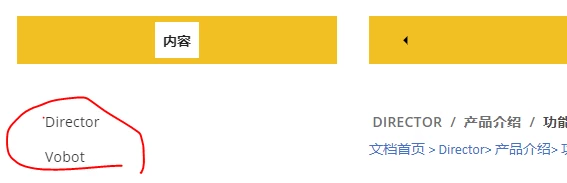
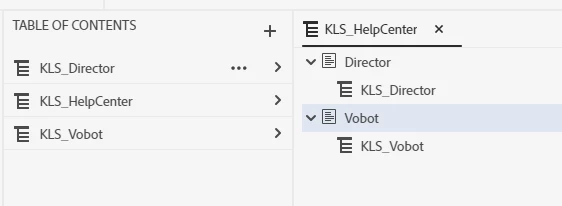
The “Studio” frameless skin is used for publish. And the TOC output is not what I expected. When I clicked the "Director" tile, the link page shows all TOC for both "Director" and "Vobot" where I only want the "Director" TOC to display only. I cannot find the corresponding settings to modify in Skin editor. And the developper cannot find the corresponding file to modify either. Is there a way to change this respond event? Thanks a lot.

    This topic has been closed for replies.

    2 replies

    Peter Grainge
    Community Expert
    Community Expert
    June 7, 2021

    There is one key point on your helpful web,"Typically the help will open with all the content available through the table of contents, the index and searching. " Does it mean there is no way or settings to show part of TOC or selected topics without filter on left panel of TOC? 


    Correct. That is what it means without filtering. You can open the help with a filter applied but then users of the other tag have to change the filter so that's not what you want.


    Adobe's own help uses custom built software that is used for all their products so you can't judge by that.


    Maybe your developers could figure out something but I'll wish them luck on that.

    ________________________________________________________
    See www.grainge.org for free Authoring and RoboHelp Information

    Use the menu (bottom right) to mark the Best Answer or Highlight particularly useful replies. Found the answer elsewhere? Share it here.
    Participating Frequently
    June 8, 2021

    Thanks a lot. We'll make some custom development with this skin.

    Peter Grainge
    Community Expert
    Community Expert
    June 4, 2021

    In a test project with topics in two folders I created one TOC for Folder One and another for Folder Two. Then I created a TOC similar to yours with no direct topics, just the two TOCs. When I click the Folder One tile I see just those topics and the Folder Two tile shows just those topics.


    I think your issue is you do not want to see all the topics in the TOC panel on the left. If that is the case then those topics are part of the TOC you have created so that is what will happen. Your TOC is in two sections but together they are the TOC.


    What would give you just the topics for that TOC is Dynamic Content Filtering (grainge.org) but only if the user selects the filter.

    ________________________________________________________
    See www.grainge.org for free Authoring and RoboHelp Information

    Use the menu (bottom right) to mark the Best Answer or Highlight particularly useful replies. Found the answer elsewhere? Share it here.
    Participating Frequently
    June 7, 2021

    Thank you very much for your answering.

    As I tested with frameless skin "Studio", if created one TOC for Folder One and another for Folder Two, all TOC and related topics will be shown on the left panel of TOC whatever I clicked the Folder One tile or Folder Two tile. 

    I looked at the Dynamic Content Filtering part but this is not what I really expected to show on the topic page. There is one key point on your helpful web,"Typically the help will open with all the content available through the table of contents, the index and searching. " Does it mean there is no way or settings to show part of TOC or selected topics without filter on left panel of TOC? Can we make it with recoding specific files? This is exact what I want. Actually, I think these files are not shown for users by Adobe. Am I understanding right?