Unfortunately clearing the CPD didn’t do the trick. 
So I opened the Topic References dialog and clicked the Edit button but no topic is opened. (I refer to the sentence “That should cause the topic … to be opened for editing. “).
What happens is that the dialog Index Keyword Topic Properties is opened. The Link to field says: “11_Lokal_administration.htm#11_2_2_Registrering_av”
“11_Lokal_administration” is an existing topic.
“11_2_2_Registrering_av” is one of the deleted topics.
I don’t understand how this dialog can help me getting rid of the broken links, since I can’t see any references to an undeleted topic. (Referring to “there are links in other topics that are still part of the help system that point to the deleted topics.”)
I have opened the topic “11_Lokal_administration” in design view and searched it manually. I can’t see any hyperlinks. I have looked at all the bookmarks (which I think the broken links were) and none of them are one of the broken links.
In the html-view I’ve used Find and searched for “11_2_2” with no luck.
Another input is that I have a hard time believing that there are links in an undeleted topic to the deleted topics. The deleted topics covered well-defined functions and it is unlikely they were referred to from some other topic, besides the topic that contains a table of contents. In the process of deleting the topics I removed the hyperlinks from the topic with table of contents. I have now opened also this topic in both design and html view to see if I could find any of the broken links, but I didn’t.
I’m starting to think that we will live with the broken links (there are only five of them). But if there is more suggestion of what I can do I would appreciate it.
Hello again
Okay, if you look at the first image I posted, the image of the Topic Refererences dialog, you should note that there are three different icons that represent the links.
Here, I'll post again so you can easily reference:
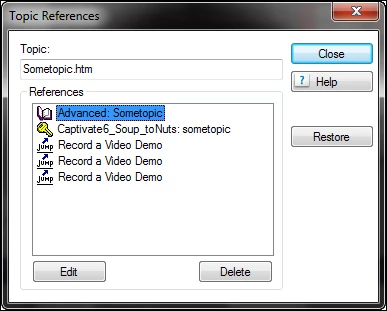
The Book icon at the top would indicate there is a TOC entry pointing to a deleted topic. In that case, you would need to edit the TOC and clicking the Edit button would result in the TOC pod opening for you to locate the topic reference and remove it.
The second icon, (The Key icon) indicates an Index reference. And as you described, clicking the Edit button would result in the RoboHelp HTML Index pod opening. In the Index pod, you have one or more references to something that was deleted. I say "something" in this case because what you listed: “11_Lokal_administration.htm#11_2_2_Registrering_av” appears to be a link pointing to a Bookmark. named 11_2_2_Registrering_av.
Your goal with this is to locate the keyword in the Index that points to the link. Find and Replace isn't finding the item because it's in the Index file and not in a topic.,
As it may be a rather daunting task to find these references by using the Index pod (if you have thousands of index entries) you may want to close the project, then open the ProjectName.HHK file in your project location. This should be a text file that you could open with Windows Notepad. You could then perform a find to locate any references to the topic. You could carefully edit that file or you could simply note the keywords pointing to the topic. Then open RoboHelp again to either edit the Index and remove the broken links or note the entries are now gone as well as the Broken links. Note, however, that if you edited the file outside of RoboHelp, you may need to again delete the CPD in order to restore parity with the other files.
As you have seen, finding and fixing broken links isn't always a simple matter. 
Cheers... Rick 



 AdChoices