Participant
December 1, 2023
Answered

How to disable spell checker?

  • December 1, 2023
  • 1 reply
  • 244 views

I can't seem to figure out how to disable the grammar check in Robohelp 2022. I'm writing documentation in Danish, so almost all words are marked as incorrect...  So how can I turn the grammar check off?

    This topic has been closed for replies.
    Correct answer Peter Grainge

    You refer to the grammar checker but then to "almost all words", which makes me wonder if you meant spell checker.


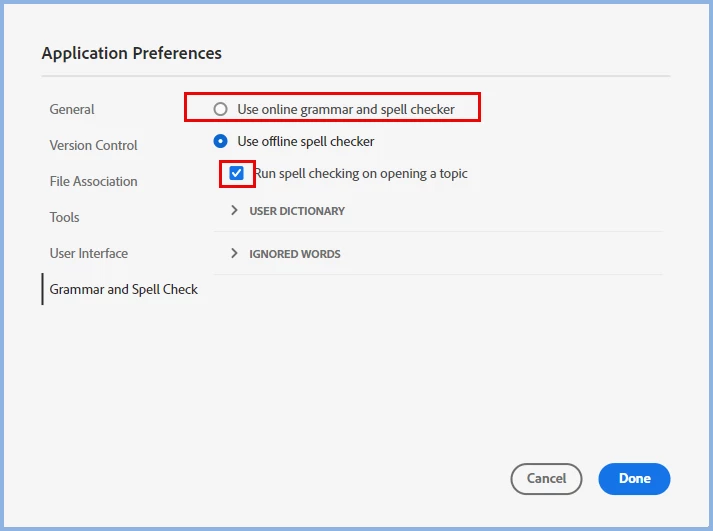
     You only get a grammar checker if you have selected the first option. If you deselect the checkbox, you will only get incorrect spellings shown when you force the option.

    ________________________________________________________

    My site www.grainge.org includes many free Authoring and RoboHelp resources that may be of help.


    1 reply

    Peter Grainge
    Community Expert
    Peter GraingeCommunity ExpertCorrect answer
    Community Expert
    December 1, 2023

    You refer to the grammar checker but then to "almost all words", which makes me wonder if you meant spell checker.


     You only get a grammar checker if you have selected the first option. If you deselect the checkbox, you will only get incorrect spellings shown when you force the option.

    ________________________________________________________

    My site www.grainge.org includes many free Authoring and RoboHelp resources that may be of help.


    Use menu (bottom right) to mark as Best Answer or to Highlight particularly useful replies. Found the answer elsewhere? Share it here.
    Participant
    December 1, 2023

    You are right, I meant 'spell checker'. Removing the checkmark has solved my issue. Thanks! 🙂