


Inspiring
May 2, 2021
Answered

How to fix dropdowns within dropdowns?

  • May 2, 2021
  • 8 replies
  • 297 views

Hi, Everyone.


In RH 2020, I now understand that dropdowns within dropdowns are a problem. And I now understand how I've been wandering into this terrible realm. Here's an example. See the breadcrumbs in this screenshot:
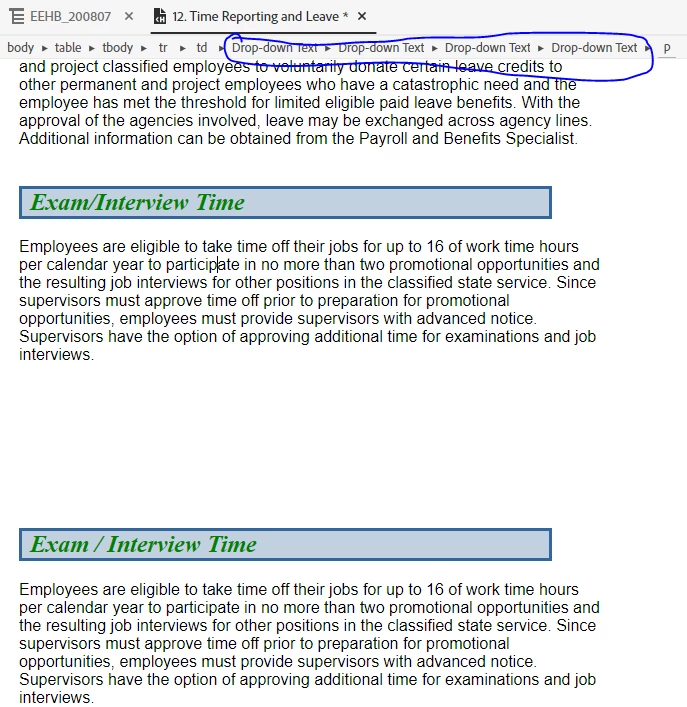


But how do I fix it?  I could just delete all the content and start over with a clean slate. But there must be a way to "remove" the dropdown formatting?


Thank you!

    This topic has been closed for replies.
    Correct answer Amebr

    Huh. I nest dropdowns (not often, but sometimes), so this could be a problem for me down the track... 


    Unfortunately I think to remove it, it will be a manual process. However, you can make it slightly easier by showing boundaries around the dropdown areas. This should make it easier to select the text. Select View > Show > Expanding/dropdown text boundary.


    Before you start removing them though, let me see if I can find out anything more.

    8 replies

    Inspiring
    May 3, 2021

     Sounds good.


    Thank you, Amber and Peter.

    Peter Grainge
    Community Expert
    Community Expert
    May 3, 2021

    Adobe are aware that currently nested dropdowns do not work in Review.

    ________________________________________________________
    See www.grainge.org for free Authoring and RoboHelp Information

    Use the menu (bottom right) to mark the Best Answer or Highlight particularly useful replies. Found the answer elsewhere? Share it here.
    Community Expert
    May 3, 2021

    I currently have a few scenarios where I'm nesting dropdowns intentionally. I've never had a problem, except for the outdated and inconvenient interface to add/edit them. 🙂


    I'm not currently on a version that supports review, but it's something I'm considering while preparing a proposal for management.  If I need to rework my nested dropdowns I'll need to factor that into any timeframes and considerations.

    Inspiring
    May 3, 2021

    Amber, thank you for the trick of showing the dropdown boundaries. That's exactly what I needed to make this easier (and to avoid nesting in future). 


    Peter, I inadvertently nested the dropdowns within dropdowns. I want to use Online Review. So I'll have to unnest them. No biggie, now that I see how to show the boundaries.


    Thanks, both of you!

    Peter Grainge
    Community Expert
    Community Expert
    May 3, 2021

    Am I getting this right?


    You had dropdowns within dropdowns and that wasn't the intention, correct? If so as Amber has said, you have to unnest them manually.


    Also along the way it was found that dropdowns within dropdowns don't work in Review. OK but are you just warning of that or is it that you will want them?


    @Amebr Is the problem for you nesting generally or nesting with the Review feature?


    Generally nesting dropdowns has always been problematic so once I know who wants what and why, I will flag this with Adobe.

    ________________________________________________________
    See www.grainge.org for free Authoring and RoboHelp Information

    Use the menu (bottom right) to mark the Best Answer or Highlight particularly useful replies. Found the answer elsewhere? Share it here.
    AmebrCommunity ExpertCorrect answer
    Community Expert
    May 3, 2021

    Huh. I nest dropdowns (not often, but sometimes), so this could be a problem for me down the track... 


    Unfortunately I think to remove it, it will be a manual process. However, you can make it slightly easier by showing boundaries around the dropdown areas. This should make it easier to select the text. Select View > Show > Expanding/dropdown text boundary.


    Before you start removing them though, let me see if I can find out anything more.

    Inspiring
    May 3, 2021

    Hi Amber.


    So last week Adobe Tech Support showed me I was doing this problematic thing. I've been nesting dropdowns within dropdowns. This isn't necessarily a problem -- that is, unless you want to use Online Review (in RH 2020). The Online Review feature does not recognize dropdowns within dropdowns. It simply stops displaying any text after the top-level dropdown. 


    That was the problem I presented to them. And they showed me the cause -- pointing to the breadcrumbs, they showed me I had inadvertently nested several dropdowns within a dropdown (screenshot).


    My question today, now that I've make this mistake yet again, is How can I remove the dropdown formatting, short of deleting everything and starting over? 


    Thank you!

    Community Expert
    May 3, 2021

    I don't understand what problem you're facing. Can you explain in more detail?