


Inspiring
Sep 28, 2020 7:35 PM UTC
Answered

How to get help from Adobe (RH 2019, new UI)?

Hi, Everyone.


This isn't really a question for the forum. I'm almost postive this issue is a software issue. So, I want to contact Adobe. 


It used to be easy to contact Adobe for software problems. But I can no longer find any way to contact them. Can anyone tell me how?


My multi-level list style is malfunctioning. It actually isn't functioning, at all. I apply the style, then select the text I want to be indented as a sub-level, and finally press Tab. But nothing happens. 


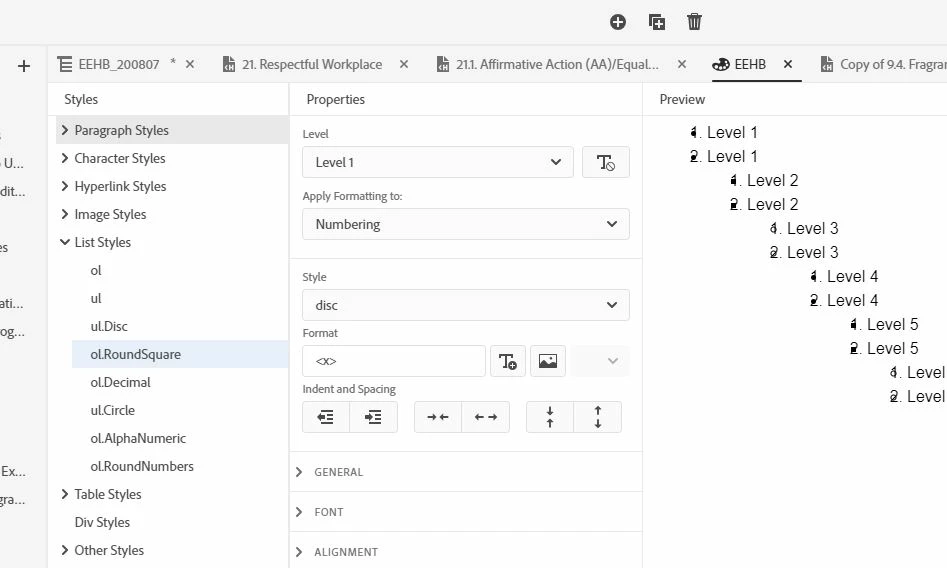
Also, another malfunction is the default style has a bullet superimposed by a number (screenshot, below). I can fix it in the CSS editor. But even after saving, it goes right back to the bullet superimposed by the number.


thank you!


SCREENSHOT
    This topic is closed to new replies. Start a new post to keep the conversation going.
    Peter Grainge
    Peter GraingeCorrect answer
    Community Expert
    Sep 29, 2020 4:04 PM UTC

    Start a fresh multilevel list. I think you know how to do that and if stuck I'll knock something up tomorrow. When done trash the one that is messed up and rename the good one so that topics using will still work. 


    This is definitely not a software issue. 


    Use the menu (bottom right) to mark the Best Answer or Highlight particularly useful replies. Found the answer elsewhere? Share it here.

    5 replies

    Inspiring
    Sep 29, 2020 4:42 PM UTC

    Hi, Peter and Jeff.


    Well, once again, I am humbled by your even-keeled, methodical approach, Peter. Your solution works! 


    One thing to note:  at first, I had mistaken your reply to say "Start a fresh" version of the text. So I created new text, and this gave me back a functioning Tab key (for indenting the sub-level). Back in the original, problematic text, it was the nonfunctioning Tab key that made me think it was a software issue. 


    But of course the messed-up style did not work when I applied it to the new, fresh text. So, re-reading your reply, I went and created a fresh multi-level list style in the CSS editor. (I've now trashed the old broken one.) And it works beautifully (see screenshot).


    Thank you so very much!


    SCREENSHOT


    Translate
    Peter Grainge
    Community Expert
    Peter GraingeCommunity ExpertCorrect answer
    Community Expert
    Sep 29, 2020 4:04 PM UTC

    Start a fresh multilevel list. I think you know how to do that and if stuck I'll knock something up tomorrow. When done trash the one that is messed up and rename the good one so that topics using will still work. 


    This is definitely not a software issue. 


    Translate
    Use the menu (bottom right) to mark the Best Answer or Highlight particularly useful replies. Found the answer elsewhere? Share it here.
    Inspiring
    Sep 29, 2020 3:53 PM UTC

    Thank you, Jeff and Peter.


    Here's what I'm trying to do (screenshot):


    Translate
    Peter Grainge
    Community Expert
    Community Expert
    Sep 28, 2020 7:50 PM UTC

    I very much doubt this is the software. Describe the appearance you are trying to achieve. 


    Translate
    Use the menu (bottom right) to mark the Best Answer or Highlight particularly useful replies. Found the answer elsewhere? Share it here.
    Jeff_Coatsworth
    Community Expert
    Community Expert
    Sep 28, 2020 7:42 PM UTC

    techcomm@adobe.com is the link to the RH & FM teams - but have you applied the patch to RH2019? Have you followed Peter's site on RH (grainge.org) for the new UI changes?

    Translate
