Participating Frequently
May 23, 2024
Answered

How to Get Rid of mini TOC Before Individual Sections in PDF Output

  • May 23, 2024
  • 4 replies
  • 765 views

Hi all, 


I'm using version 2022.4.179.


I'm new to RH and am popping on with what is likely a dumb question. When I produce PDF output with the High-Tech template, I'd like just one main TOC in the front matter. That overarching TOC generates just fine, but the problem is that before each section, or chapter, there is a mini Chapter TOC of the section's contents. I don't want that for this project--just the main TOC page. 


Is there a way to get rid of the smaller TOCs preceding chapters in PDF output? I can't figure out the right setting! 


Thanks all. Any help is appreciated! 

    This topic has been closed for replies.
    Correct answer Peter Grainge

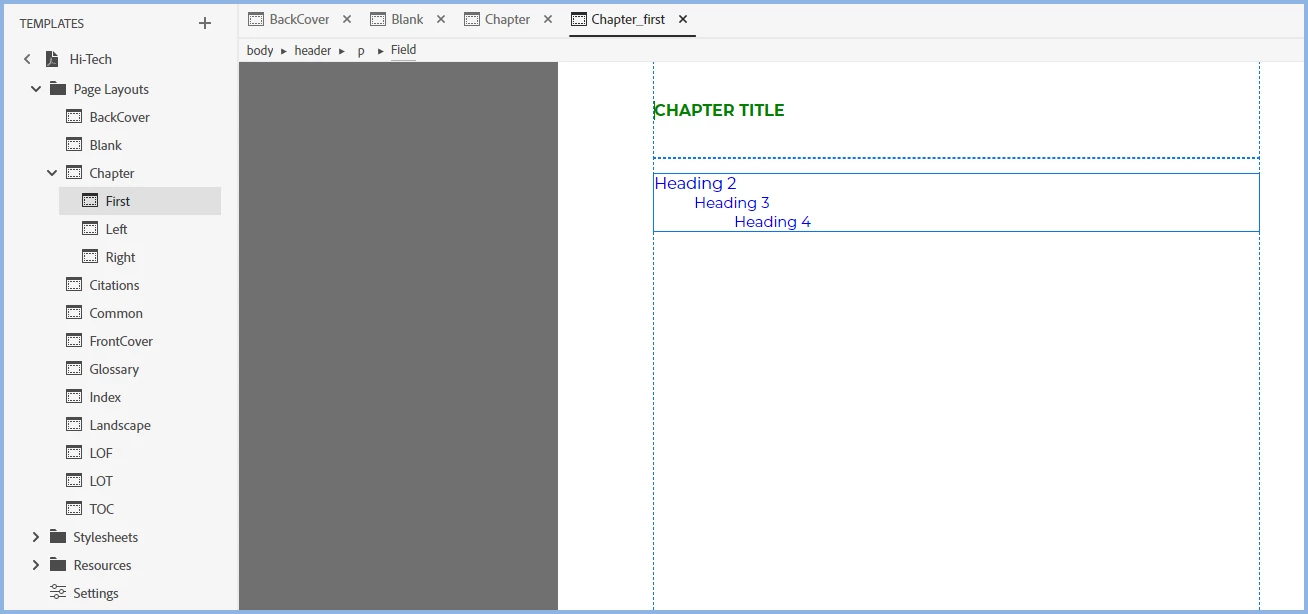
    Try removing it here.


    ________________________________________________________

    My site www.grainge.org includes many free Authoring and RoboHelp resources that may be of help.


    4 replies

    Peter Grainge
    Community Expert
    Peter GraingeCommunity ExpertCorrect answer
    Community Expert
    May 23, 2024

    Try removing it here.


    ________________________________________________________

    My site www.grainge.org includes many free Authoring and RoboHelp resources that may be of help.


    Use menu (bottom right) to mark as Best Answer or to Highlight particularly useful replies. Found the answer elsewhere? Share it here.
    Cheri677Author
    Participating Frequently
    May 23, 2024

    I had just tried editing this section in the html editor, and it works! If others run into the same issue, note that there isn't really a way to eliminate the chapter TOCs in the wysiwyg editor, but just delete the appropriate code here. Thanks, Peter!  

    Peter Grainge
    Community Expert
    Community Expert
    May 23, 2024

    Yes there is.


    Click in the mini TOC. Right click the breadcrumb and select Delete. Quite a few things in RoboHelp require clicking the breadcrumbs.

    ________________________________________________________

    My site www.grainge.org includes many free Authoring and RoboHelp resources that may be of help.


    Use menu (bottom right) to mark as Best Answer or to Highlight particularly useful replies. Found the answer elsewhere? Share it here.
    Peter Grainge
    Community Expert
    Community Expert
    May 23, 2024

    @Jeff_Coatsworth pretty sure it can be removed.

    @Cheri677 Look in the template pages. I will look later.

    ________________________________________________________
    My site www.grainge.org includes many free Authoring and RoboHelp resources that may be of help.


    Use menu (bottom right) to mark as Best Answer or to Highlight particularly useful replies. Found the answer elsewhere? Share it here.
    Jeff_Coatsworth
    Community Expert
    Community Expert
    May 23, 2024
    Jeff_Coatsworth
    Community Expert
    Community Expert
    May 23, 2024

    I suspect that you'll need to create a new TOC to use only for PDF generation that doesn't include the extra stuff.

    Jeff_Coatsworth
    Community Expert
    Community Expert
    May 23, 2024
    Jeff_Coatsworth
    Community Expert
    Community Expert
    May 23, 2024

    Are the mini-TOCs present in the topics themselves?

    Cheri677Author
    Participating Frequently
    May 23, 2024

    No, it looks like RoboHelp is just pulling from the Sections in my book TOC to generate the chapter TOCs in output.