


Inspiring
December 21, 2021
Answered

How to hide or disable buttons on home page

  • December 21, 2021
  • 24 replies
  • 1606 views

Hi Everyone.


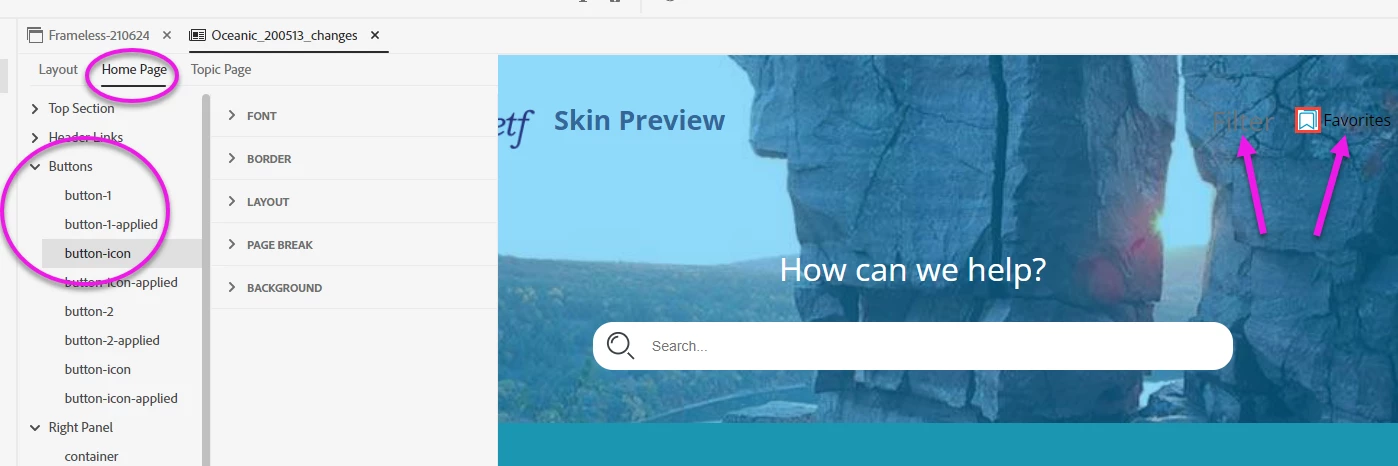
We don't want the buttons of our skin to appear on the home page. I've looked all over the skin editor (see screenshot). But I don't see any way to hide or disable the buttons.


Is there any way to do this?


Thank you!


SCREENSHOT:


    This topic has been closed for replies.
    Correct answer Amebr

    I don't have RH2020 right now, but check there isn't anything in the Output Preset (unlikely but worth checking) or on the Skin > Layout tab.


    Assuming nothing there, try selecting "button-x", expanding Layout and setting Display to 'none'. (Working off screenshots and guesswork - hopefully reasonably accurate guesses 😛  )

    24 replies

    Inspiring
    February 1, 2022

    Sounds good, Amber.


    Thank you for getting me this far with all the clues we've collected. And for the contact info and email recommendation.


    Will report back. Have a great day. 

    Community Expert
    January 31, 2022

    In your screenshot of the Layout >  Topic Page Buttons settings you can see that the filter button has an ID of '0' (zero), so I think theoretically it should show up in the Home Page button settings. I don't have RH2020 to poke around, but I suspect you'll need to contact support for help.


    See the following page for support contact options. Email is the preferred method as it gets to Robohelp staff.
    https://helpx.adobe.com/contact/enterprise-support.other.html#robohelp

    Inspiring
    January 31, 2022

    PS:  Sorry, I should've shown you this screenshot, instead:


    There doesn't appear to be any controls specifying the buttons for the home page.


    Thoughts?

    Inspiring
    January 31, 2022

    Yes! Here's the Layout section of the Skin Editor:


    How do I add "Button 0" to the list, below, so I can edit it:


    Thank you!


    Community Expert
    January 30, 2022

    Okay, so the filter button is button-0. How to get that back in the skin styles (Home Page > Buttons) I'm not sure, as I don't currently have RH2020 (I'm hoping to have that sorted out this week)


    Is there a place in the Layout section where you specify the buttons for the home page? If so, what buttons do you have defined? If Filter isn't listed, perhaps you can add it?

    Inspiring
    January 28, 2022

    Thank you so much, Amber.


    Here it is:


    Community Expert
    January 27, 2022

    Okay, in this image, you can see the style name for the Favourites button (it is button-1)


    Can you expand the <li role="presentation">...</li> line above it, so I can see what's inside? I've marked the appropriate place with an arrow. If there's another <li> after the favourites button, please expand that too.


    Inspiring
    January 27, 2022

    One more screenshot:


    Inspiring
    January 27, 2022

    Ah! Here might be something! 


    While still in the dev tools, I right-clicked the favorites icon. The gray highlight focused on code for that icon. 


    But then I hovered over other lines of code. And voila! The light-blue highlight focused on the filter area (in the preview, it's the dashed lines.)


    Does that tell you anything?


    Inspiring
    January 27, 2022

    Thank you, Amber.


    Here are two screenshots, below.


    1. What the filter button looks like
    2. The dev tools after I right-click the filter and select Inspect


    Can you make anything of them?  Should I open either of the drop-downs in the dev tools and show you the contents?


    Thank you!


    SCREENSHOT 1


    SCREENSHOT 2