babs7344
Participating Frequently
Jun 26, 2017 8:32 PM UTC
Answered

How to locate and remove unused image files in RoboHelp?

I use a lot of image files via DHTML. How can I find and delete unused image files in a RoboHelp project?

This topic is closed to new replies. Start a new post to keep the conversation going.
Captiv8r
Captiv8rCorrect answer
Legend
Jun 26, 2017 9:11 PM UTC

Hi there

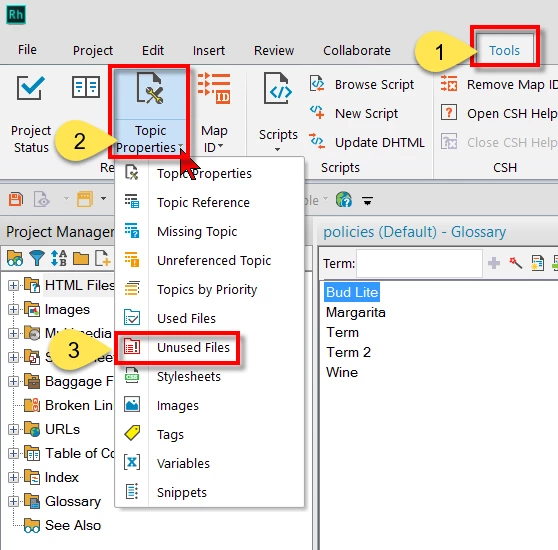
RoboHelp has a report you can run that may help. It's called unused files. In older versions it is on the Tools > Reports menu. In newer versions it's on the Tools tab.

Cheers... Rick

6 replies

Captiv8r
Captiv8rCorrect answer
Legend
Jun 26, 2017 9:11 PM UTC

Hi there

RoboHelp has a report you can run that may help. It's called unused files. In older versions it is on the Tools > Reports menu. In newer versions it's on the Tools tab.

Cheers... Rick

Translate
babs7344
babs7344Author
Participating Frequently
Jun 26, 2017 9:29 PM UTC

Thanks!!

I did a search in RoboHelp online help and couldn’t find an answer using images or unused images. So this helps!!

Barbara Beresford

Sr. Pr. Technical Writer

MorphoTrust USA

Translate
Captiv8r
Legend
Jun 26, 2017 9:31 PM UTC

Note that before I would just wholesale delete anything I would move the files to a temporary folder just to be on the safe side.

Translate