


Answered
How to omit headings or pages from the ToC?
I finally got all my projects updated to 2022.1 with all the output working and looking as expected.
Today, I installed the Update 2. Now the ToCs for my PDFs have page numbers for the headings on the cover page and the ToC itself, where they didn't before.
Update 1:
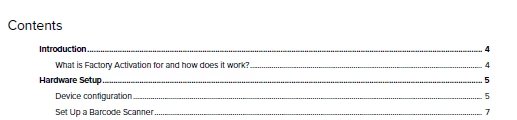
Update 2:
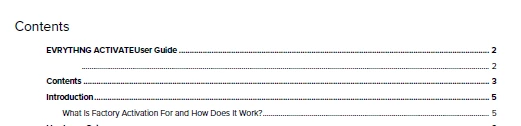
Is there a tried and true way to omit specific headings (or pages) from the ToC? The Cover page uses cover-specific classes on the H1 and H2. How can I set the ToC to exclude them (and the Contents page itself)?


 AdChoices