

Participating Frequently
March 22, 2021
Question

How to order assets (current version of RpoboHelp

  • March 22, 2021
  • 2 replies
  • 204 views

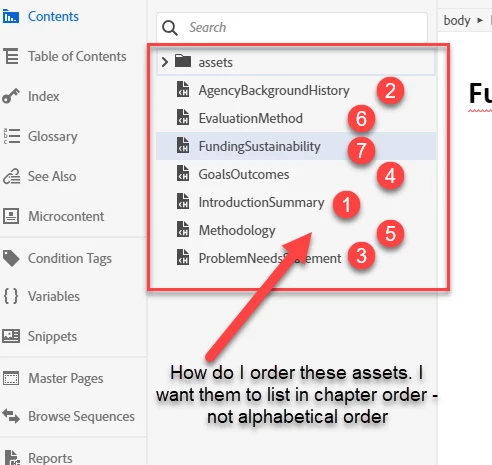
Hi - is there a way to order this list of assets other than alphabetically?   .... Thanks. (Chapter Order 1-7)


    This topic has been closed for replies.

    2 replies

    Community Expert
    March 23, 2021

    Once you reach a certain participation level, you'll get the ability to edit posts. What that level is, is not disclosed to us.


    I wouldn't normally point out something like that, but New UI is so new there's been a few misunderstandings about what was being asked. 🙂

    Community Expert
    March 22, 2021

    That's the list of topics, not the contents of the assets folder I think (yes, I know that's splitting hairs a bit. 🙂  )


    The Contents panel is a view of your files system, the same as Windows Explorer (I imagine Macs have a similar tool, but I don't know what it is). So alphabetical is your only option. You could prefix your topic titles so that they appear in the order you want (prefix with 1 for the first chapter, 2 for the second, etc). Or create a folder for each chapter and drag your topics into the relevant folder. Both methods may be problematic if a topic appears in more than one chapter.


    Otherwise, you could use your table of contents, which by definition shows your topics in chapter order. Either click on the arrow next to the relevant table of contents to show the TOC in the side panel, or double-click to open it as a tab in the Editor panel. Then double-click on the toc entry to edit it.

    Hugh5E06Author
    Participating Frequently
    March 23, 2021

    Thanks, I was not able to edit the original post to Contents from assets. Glad you saw through it. Thanks, I'm using the TC to navigate the Contents in order...
