
June 27, 2016
Answered

How to reference a .CHM file rather than copy it into a merged project?

  • June 27, 2016
  • 1 reply
  • 863 views

Hello! I am assigning new .CHM files to existing merged projects. You may recognize this picture:
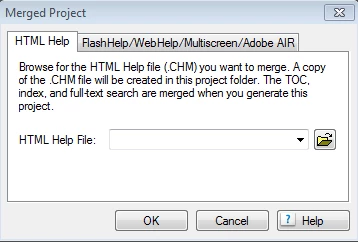
When I go to assign a (in my case) an existing merged project a new .CHM file, I am presented with this dialog. However, I do not want the .CHM file to be copied in, I want it to reference a .CHM file. This is because I am working on a help project that compiles many other help projects that get changed separately from time to time. This leaves the compilation project out of date if the .CHM files are simply copied in; they're just older copies.

Is there a way to have a merged project point to a .CHM file rather than copy it in so that it reflects outside changes made to the .CHM file?

Thanks!

This topic has been closed for replies.
Correct answer Captiv8r

I'll post a video showing you what's what in the morning.


Okay, here's the vid. Apologies for the duration. It's roughly 10 minutes long.

YouTube

Let me know if it helps... Rick

1 reply

Captiv8r
Legend
June 27, 2016

Hi there

I'm either confused about what you are hoping to achieve or you are possibly confused about the way merged CHM files work.

When you reference a CHM file via the TOC, you are inserting a placeholder that tells the master CHM to look for and include the CHM file you are adding. At that point it may copy the CHM file into the master output location, but you should be able to just plop a new version of the CHM file into the same location and overwrite the one that was there before and all new information should then become available to the end user as long as you include the updated version of the CHM file.

Cheers... Rick

June 27, 2016

Hi Rick, thanks for the quick response! That sounds like exactly what I'd like, I think maybe I'm missing something. I have gone ahead and included some .CHM files (from other projects) in my master projects TOC, and when I go to change the contents of the .CHM files (in their own project) I referenced  in my master, I'm not seeing those changes reflected even when I generate and save the referenced project.

I think maybe I am having an issue with publishing the child projects, which I read was necessary to reflect the changes in the master. I was checking this little guide out (Adobe RoboHelp 11 * Merging Help projects ) and I am not able display the publishing settings because I am unable to click next in my generation dialog.

Any thoughts about this issue? Thanks!

Captiv8r
Legend
June 28, 2016

I'll post a video showing you what's what in the morning.