Inspiring
May 27, 2020
Answered

How to remove breadcrumbs from master page

  • May 27, 2020
  • 3 replies
  • 630 views

Hi, Everyone.


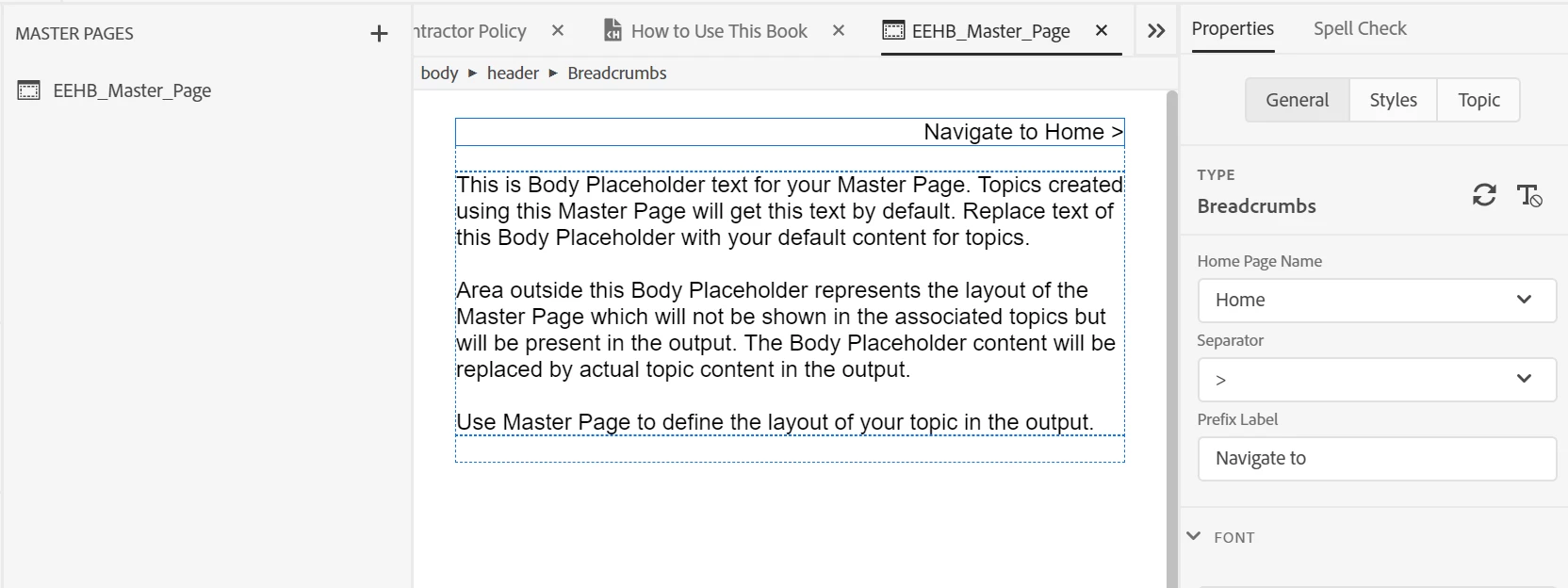
Can someone please tell me how to remove or disable breadcrumbs from a master page?


Here's what mine looks like, below.


Thank you!
 

    This topic has been closed for replies.
    Correct answer Peter Grainge

    Put the cursor in front of the breadcrumb in the header and delete it.


    3 replies

    Inspiring
    May 29, 2020

    Oh!!   Well, that's just silly. Before, I was highlighting the breadcrumbs and hitting Delete, which only throws an error:  "Warning:  read only content."


    Thank you, Peter. I have a feeling this technique will come in handy in other ways.

    Peter Grainge
    Community Expert
    Peter GraingeCommunity ExpertCorrect answer
    Community Expert
    May 27, 2020

    Put the cursor in front of the breadcrumb in the header and delete it.


    Use the menu (bottom right) to mark the Best Answer or Highlight particularly useful replies. Found the answer elsewhere? Share it here.
    Inspiring
    May 27, 2020

    PS:  sorry, forgot to mention this is RH 2019, new UI.


    Thanks!
