


Known Participant
August 15, 2011
Question

HTML code appears corrupted - anyone run into this problem?

  • August 15, 2011
  • 4 replies
  • 676 views

Using RH8 HTML - All of my topics have unusual spacing in the html code.  This happens with a brand new project - starting right from the menu to select a new project.  As soon as the project is created I go into the first topic and look at the html code and it looks something like this:
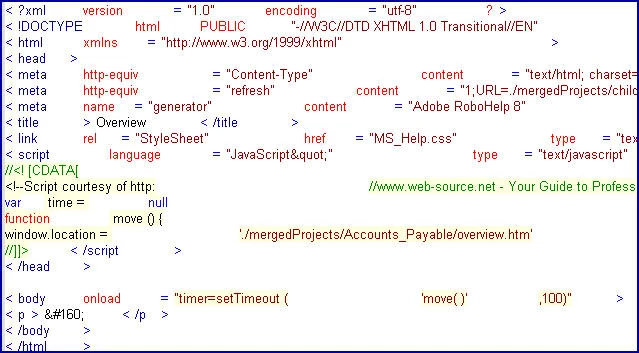
OK, even though it's hard to read, you can get the jist of it.  This happens with old or new projects.

I am hoping I do not have to have our IT staff perform a uninstall/install.  Any feedback is greatly appreciate.

Rob

This topic is closed to new replies. Start a new post to keep the conversation going.

4 replies

Peter Grainge
Community Expert
Community Expert
August 15, 2011

Just want to add that the usual trick of restoring the default font to Courier at 100% does not work as the dropdown is blank when Robert accesses it.

Also this applies to any project Robert opens, including the samples.


See www.grainge.org for RoboHelp and Authoring tips

@petergrainge

Use the menu (bottom right) to mark the Best Answer or Highlight particularly useful replies. Found the answer elsewhere? Share it here.
Community Expert
August 16, 2011

Could the rhfontset.apj file be empty? How this would happen for all projects I'm not sure, but it would be worth checking before doing a full uninstall/reinstall.

Known Participant
August 16, 2011

How would I be able to view the contents of this file?  Also, after posting my message, I went to another machine that has a copy of RH8 installed and opened some of the same project files and the html code looked fine.  I am leaning more toward the fact I will need a uninstall/install performed. 

I'll wait another day or two to contact our IT team to perform this task.