
brendasue1701
Participant
April 3, 2019
Question

HTML view in RoboHelp Alignment Help

  • April 3, 2019
  • 1 reply
  • 481 views

I'm kind of a noob here.  I opened an existing RH document, made one change and suddenly my alignment in the HTML view is all spread out in something that looks like full justification rather than left justify. I exited and didn't save but it is still that way when I go back in. The Design side is fine. I have tried to change the view in HTML but cannot find how to undo whatever it is that I did. I have googled to no avail. I'm sure it is something crazy simple but I can't work in it this way.
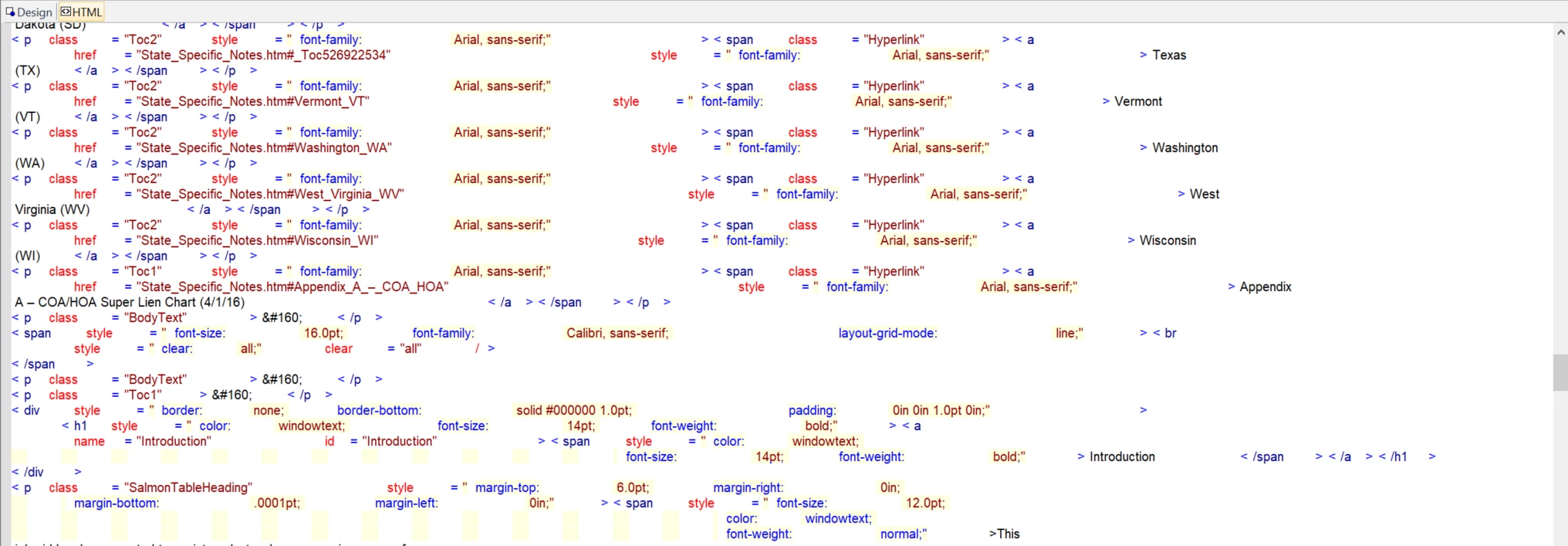
This topic has been closed for replies.

1 reply

Peter Grainge
Community Expert
Community Expert
April 3, 2019

Set the font to Courier at 100% and it should be OK.

Peter Grainge

www.grainge.org

@petergrainge

Use the menu (bottom right) to mark the Best Answer or Highlight particularly useful replies. Found the answer elsewhere? Share it here.
Peter Grainge
Community Expert
Community Expert
April 3, 2019

If you want a non serif font, you can use Lucida Console. It's a known problem that has existed for years. Those two fonts work OK.

You haven't said what version of RoboHelp you are using but with 2017 it looks as if you are not limited to 100%. I think initially the problem involved both settings.


See www.grainge.org for free RoboHelp and Authoring information.

@petergrainge

Use the menu (bottom right) to mark the Best Answer or Highlight particularly useful replies. Found the answer elsewhere? Share it here.
brendasue1701
Participant
April 4, 2019

I’m using RoboHelp 11. And this fixed it. I don’t know whether to be happy or mad that such a simple thing could cause so many problems. I spent so much time trying to figure this out! Thank you so much.