
Inspiring
March 8, 2019
Answered

HTML5 Layout: Modify Header Background for Direct Linked Page

  • March 8, 2019
  • 5 replies
  • 2038 views

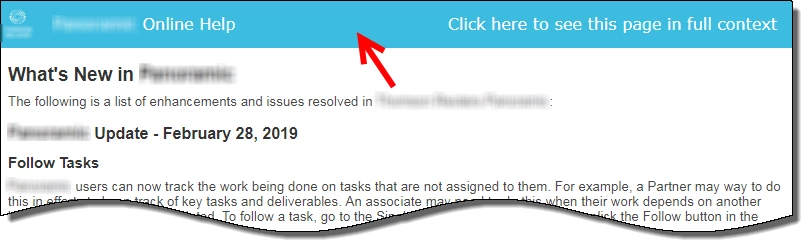
Anyone know how to modify the header displayed when a topic is accessed via a direct link, instead of the TOC or Index? None of the layout edit options I can see in the Layout Customization editor relate to this view. I just want to change the color of the background (shown below). I'm using RoboHelp 2019 (Classic), with the most recent update installed. Also, we are using the Indigo layout.

By the way, the background color we configured to display in full view is orange but that color, for some reason, is not used in this view. Which makes no sense.
This topic has been closed for replies.
Correct answer Amebr

I've found 2 ways.

One is to add a new style to your topic stylesheet. Add the style "topic-header" to the div group and set the Shading colour to what you need. (Or manually in a text editor add div.topic-header {background-color: <your colour>;} . )

If you use multiple topic stylesheets you might need to make this change in each, I'm not sure.

Or, you could update a single value in the usersettings.js file in the screen layout. Just change the value of the line starting with 'var backgroundColor'. It's only about 20 lines from the top of the file. I'm not sure if you're supposed to edit this file, but it's visible in RH. (I personally think it's probably a bug that this isn't updated with the colour you select in the screen layout editor.  )

5 replies

Peter Grainge
Community Expert
Community Expert
January 17, 2024

That looks like someone has applied the colour to each header using Content Properties rather than applying it in the CSS.


Select a heading in a topic that has this colour and switch to Source View. The code will probably look like this.


<h1 style="background-color: #DAEFF6">First Topic</h1>


You can use Find and Replace set to look in Source View.


Find = h1 style="background-color: #DAEFF6"


Replace = h1


I have deliberately not included the tags in case you have other stuff after the colour.


That will remove the colour. You could use the replace to change the colour but the better solution if it is to apply to all topics is to change the background colour in the CSS editor. Then future changes will be easier.


Create a backup first. I always recommend creating the backup as a zip file. That prevents you opening it accidentally and working on it before you realise it was the backup. This way you always have a clean backup that can be used to create a new clean copy time after time.

________________________________________________________

My site www.grainge.org includes many free Authoring and RoboHelp resources that may be of help.


Use menu (bottom right) to mark as Best Answer or to Highlight particularly useful replies. Found the answer elsewhere? Share it here.
Peter Grainge
Community Expert
Community Expert
January 12, 2024

@John33919052p52b You said you located where to make the change but didn't tell us where. A screenshot might help. Please use the photo icon to insert images within the post. Seeing an image inline with the text makes it easier for anyone answering or viewing the post.

________________________________________________________

My site www.grainge.org includes many free Authoring and RoboHelp resources that may be of help.


Use menu (bottom right) to mark as Best Answer or to Highlight particularly useful replies. Found the answer elsewhere? Share it here.
Known Participant
January 16, 2024

There was a little arrow next to the banner that once i selected it i was able to change the shading properties.  However its not global.  Thanks again for everyones input I appreciate it.  


Community Expert
January 11, 2024

Yeah, that isn't a default RH feature but something specific to the project. I would think a master page as Jeff said, especially if it is added to every new topic you create.


Otherwise, it's in each individual topic and you'll have to change them one by one.

Community Expert
January 11, 2024

(And definitely not the same problem as the original post.)

Known Participant
January 11, 2024

Thank you all for your help. 

Community Expert
January 11, 2024

You  are using a completely different version to the OP. You also say this is a problem for all your topics. So this may not be the same issue. 


Can you confirm the full RH version number, which output type you are generating and the skin/template you are using? Are you seeing this problem when navigating via the table of contents or only in certain circumstances? If only in certain circumstances, can you describe when this happens in more detail?

Known Participant
January 11, 2024

Hello


Im using Version Robohelp 2022.3.93


As you see in the attached image, the header for all my topics, are this teal color that Im unable to edit at all.  I tried and looked everywhere.  If I highlight the text I can change the background but it doesnt change all of it.  Im using a Framless output with the Oceanic Template.    Thank you.  

Jeff_Coatsworth
Community Expert
Community Expert
January 11, 2024

So what you show is the project topic view (Authoring) - does that appear wrong in the output you generate? 

AmebrCommunity ExpertCorrect answer
Community Expert
March 8, 2019

I've found 2 ways.

One is to add a new style to your topic stylesheet. Add the style "topic-header" to the div group and set the Shading colour to what you need. (Or manually in a text editor add div.topic-header {background-color: <your colour>;} . )

If you use multiple topic stylesheets you might need to make this change in each, I'm not sure.

Or, you could update a single value in the usersettings.js file in the screen layout. Just change the value of the line starting with 'var backgroundColor'. It's only about 20 lines from the top of the file. I'm not sure if you're supposed to edit this file, but it's visible in RH. (I personally think it's probably a bug that this isn't updated with the colour you select in the screen layout editor.  )

Peter Grainge
Community Expert
Community Expert
March 8, 2019

Well done Amber/

@Dirk. You should report that as a bug. Please follow this link to report bugs and request features. The more people who do so, the higher it gets prioritised.

https://tracker.adobe.com

Post the link to that bug/feature in this thread and others can vote for it.


See www.grainge.org for free RoboHelp and Authoring information.

@petergrainge

Use menu (bottom right) to mark as Best Answer or to Highlight particularly useful replies. Found the answer elsewhere? Share it here.