


HTML5 Projects Publishing to Wrong RoboHelp Server Contexts Folder
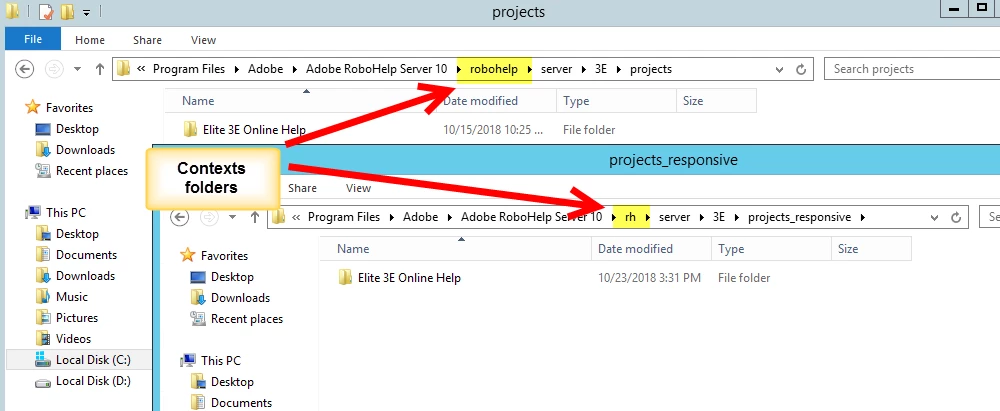
Our RoboHelp Server Configuration Manager only list one context, the default /roboHelp to which our projects - both WebHelp Pro & Responsive HTML5 - have published to in the past. Recently we've noticed that our projects are publishing into a "rh" context. We did not create this context, not knowingly anyway. Additionaly, this 'rh' context does not appear as an option in the context drop-down list. We only see /robohelp.
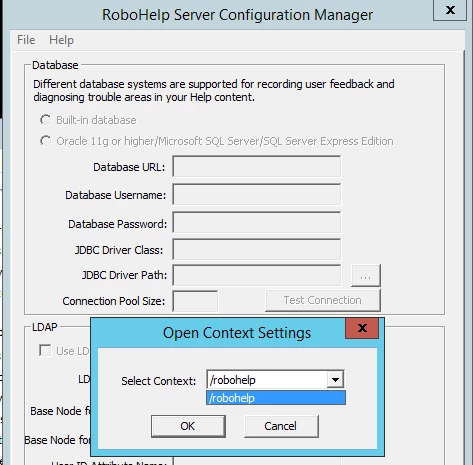
As far as I can tell, this rh context and publishing behavior started happening after we installed the Update 1 patch for RH Server 10. We are running RH Server 10.0.1.237 with Tomcat 8.5. And were using RH 2017.
Any ideas on how to delete the 'rh' context sense we can't select it in the Configuration Mngr? At this point the only thing I can think of is to reinstall the RH server software.
 AdChoices