


Known Participant
February 8, 2021
Answered

Hyperlink to Bookmarks - in Context-Sensitive Topics

  • February 8, 2021
  • 17 replies
  • 2395 views

I am using RoboHelp 2019 (going to RH 2020 soon), with a huge help project that has Responsive HTML5 output. Our help is "attached" to our application, and help topics are launched when the user clicks the Help button on a web page in the system.  Of course, there's the option to switch to "full context" view when the individual topic is displayed in my Charcoal_Grey layout.  

Here's an example of what appears when I click the Help button from within the application (context-sensitive mode):
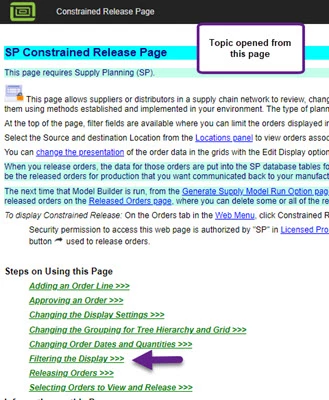


The problem is that we have many hyperlinks to bookmarks in various places, both within the same topic and within other topics.  In the example below, the hyperlink is set to go to the bookmarked "Filtering the Display" steps included above:
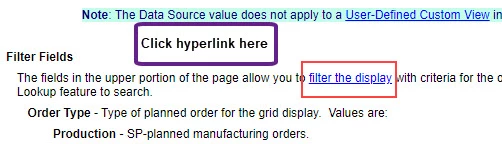


However, when I click the hyperlink, it goes to a different place, 2 lines below the bookmark target for "Filtering...".
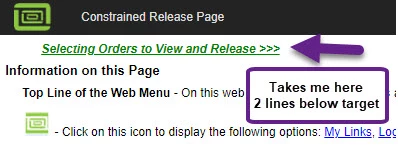


In the project, these sets of steps (in this example) are bookmarked as below:
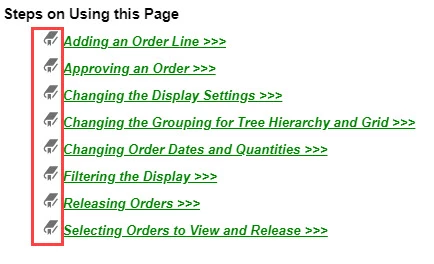
 

This also occurs if I go to any bookmarked place within that topic - section heading or field description.

NOTE:  This symptom does NOT occur if I view in "full context" mode - which obviously has a different type of heading in the layout.  It works correctly in this "standalone" mode too.

Since these hyperlink-to-bookmark are everywhere in our help system, we need to resolve this.  In prior versions, we were using WebHelp, and this issue wasn't happening.

I suspect this is related to our layout setup, but I'm not sure exactly what to try to change.  We are not required to continue using Charcoal_Grey.  As long as we have a link to switch to "full context" mode for our TOC/Index/Search.

I even thought in looking at the heading that perhaps to change the size of our logo. What controls the "height" of the heading bar for a single topic in context-sensitive mode?

So, I need help!!  Perhaps switch back to WebHelp??  A different layout?? Adjustment to a Responsive layout??

Thanks in advance!! I have had great fortune in getting answers from the wonderful expert users here!  Hope I have explained this issue clearly enough to understand.

Susan

This topic has been closed for replies.
Correct answer Amebr

This might work, although it does mean that the link destination ends up a bit lower down the page that normal in full layout view. Also make sure you test extensively in all browsers you need to use. And check it doesn't do anything else funny to the display in the full layout view.


Add it to your css file.


[id]:target:before {
display:block;
content:'';

visibility: hidden;

padding-top:3em;
margin-top:-3em;
}


3em for padding-top and margin-top should be fine for the current default height of the csh header bar, but would need to be changed if Adobe changes it in future, or you modify it yourself, somehow (I don't think it's currently easily accessible, but I haven't checked thoroughly).

17 replies

Peter Grainge
Community Expert
Community Expert
February 17, 2021

That's the one. If the post spans multiple pages, that post repeats at the top of each page. 

________________________________________________________
See www.grainge.org for free Authoring and RoboHelp Information.

Use the menu (bottom right) to mark the Best Answer or Highlight particularly useful replies. Found the answer elsewhere? Share it here.
Known Participant
February 17, 2021

Thanks so much!

By the way - I use your site, always helpful.

Peter Grainge
Community Expert
Community Expert
February 17, 2021

No apologies needed. The forum should not work this way but it does.


Always coming to the web page and only using the Blue button avoids the issue.

________________________________________________________
See www.grainge.org for free Authoring and RoboHelp Information

Use the menu (bottom right) to mark the Best Answer or Highlight particularly useful replies. Found the answer elsewhere? Share it here.
Known Participant
February 17, 2021

The only blue Reply button that I see is at the bottom of my original post in the thread.  Correct?


Peter Grainge
Community Expert
Community Expert
February 17, 2021

The problem with the forum is that if anyone uses the black reply button or replies by email, the reply nests in rather than going to the end of the thread. It is then virtually impossible to work out the chronological order of posts. I don't know how you post your replies but if it's not via the web page, take a look at that to see what I mean. 🙂


I saw you had found a solution but also you had filed a ticket. I didn't stop to see which came first as anyway you may have taken the view that while you had a fix, there was an underlying cause that you saw as a bug. Hence suggesting the image size in case you still wanted to pursue the bug.


To be honest, as Amber and I were not seeing the issue, I'm inclined to the view that it was just a CSS issue. If you agree, maybe update the bug report?


Hope that explains and glad you have the show back on the road. 

________________________________________________________
See www.grainge.org for free Authoring and RoboHelp Information

Use the menu (bottom right) to mark the Best Answer or Highlight particularly useful replies. Found the answer elsewhere? Share it here.
Known Participant
February 17, 2021

Yes - I do see that I really messed up my replies, and possibly created more confusion!!  Sorry for that. I do appreciate your letting me know here, so I won't Reply in that confusing way again!


I will go to the Bug Tracker and update it.  I had entered that Bug before I confirmed the CSS resolution.

Sorry to everyone to create the confusion here with my ill-placed replies.

Thanks!

Susan

Peter Grainge
Community Expert
Community Expert
February 16, 2021

Images in most formats are allowed. Maybe a size restriction issue?

________________________________________________________
See www.grainge.org for free Authoring and RoboHelp Information

Use the menu (bottom right) to mark the Best Answer or Highlight particularly useful replies. Found the answer elsewhere? Share it here.
Known Participant
February 16, 2021

Possibly an image size restriction.  BUT see my latest post above - I think that Amebr's CSS update solution worked!  I tried it again, and changed the measurement to "4em", and it worked on a smaller project.  Then on my gigantic project, I generated with the updated CSS, and the hyperlinks are taking me to the bookmark target where the paragraph is now visible!!!

Next thing to know - see how our application displays the CSH topic with the established call.  Should know by tomorrow's build / install.  It's looking good!

I really appreciate your help and Amebr's help here!!

Susan

Peter Grainge
Community Expert
Community Expert
February 13, 2021

I agree with Amber, this needs to be reported.

________________________________________________________
See www.grainge.org for free Authoring and RoboHelp Information

Use the menu (bottom right) to mark the Best Answer or Highlight particularly useful replies. Found the answer elsewhere? Share it here.
Known Participant
February 16, 2021

I reported this issue to the Tracker page.  Unfortunately it wouldn't let me attach the image files, so assuming that someone will contact me - or look at this thread - to see the details.

Bug number is: RH-8654

Community Expert
February 11, 2021

I should also note you can request features and report issues here: https://tracker.adobe.com/


I think the link should go to the right place even if in CSH mode. If you do log a ticket, post the number here so other people can vote on the issue.

Community Expert
February 11, 2021

The code looks fine. All I can suggest is there's something different about this project, given you said it works correctly in all other projects. Unfortunately I'm out of ideas for what that difference could be (I don't use New UI, so have only used it for light testing rather than discovering real life problems.)

Known Participant
February 12, 2021

Actually I have seen this in a couple of my medium sized projects. So maybe I should report it. 

I think we just need to change the call to the CSH topics, to go to full screen mode.  We know that our hyperlinks work in full screen display. 

And when we go fully into RH 2020, we will see what happens with this gigantic project.  At this time, our R&D group is at the end of frantically completing a system release, so I can't ask the developers to change the CSH call yet. After this release is done, I will have more time to experiment with Frameless output.

I do appreciate everyone's help here.  

Community Expert
February 10, 2021

Could you post the code for the "Filtering Display" target? I'm just wondering if the bookmark wasn't upgraded to the new way of doing things for some reason, but I can't tell without seeing the code.

Known Participant
February 11, 2021

This one happens to be a dropdown text one, as you can see.  But bookmarks for headings and field descriptions also have this problem

Community Expert
February 9, 2021

For our main gigantic help project, unfortunately this did not work.  Hyperlink target still goes to 2 lines below. Should I try to up the "em" to a higher em value?


By @Freespirit-ST


Hmm, the size of the project shouldn't make a difference. Is there a merge involved? Is the same skin being used with all the same settings and style sheet?


I didn't test on an upgraded project, so perhaps there's some weirdness in the upgraded code. Could you post the output code for one of the links and destinations that's not working? Perhaps I can spot something.

Known Participant
February 10, 2021

It is a project upgraded to RoboHelp 2019 "reimagined".  The code for the link is here in this paragraph:


<p style="margin-left: 24px;">The fields in the upper portion of the page allow you to <a href="#Filtering">filter the display</a> with criteria for the orders to view. Use the filter fields to select the order type and release status for the page
display. You can also select the date range to filter orders. Use the Item field to enter a specific item or use the Lookup feature to search.</p>


The target is the bookmarked "Filtering the Display" - shown in the screenshot above.


Known Participant
February 10, 2021

No merge is involved.  Same skin and stylesheet used for entire project.

Peter Grainge
Community Expert
Community Expert
February 9, 2021

Calling Context Sensitive Help (grainge.org)

________________________________________________________
See www.grainge.org for free Authoring and RoboHelp Information


Use the menu (bottom right) to mark the Best Answer or Highlight particularly useful replies. Found the answer elsewhere? Share it here.
Known Participant
February 9, 2021

Thanks so much!!