


Known Participant
September 2, 2021
Question

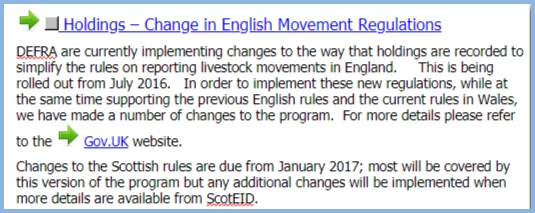
Hyperlinks have developed green arrows next to them

  • September 2, 2021
  • 4 replies
  • 269 views

I have recently upgraded from Robohelp 10 to version 2020 which has been a huge leap.  While I am slowly working my way round there is one big issue I cannot solve.  I use hyperlinks extensively to jump to different topics.  Since upgrading they have all got a green arrow next to them.  I assume this is a setting somewhere but I cannot find how to turn it off.  I would be grateful if anyone could tell me how to change this so that jumps/hyperlinks are just the normal blue and underlined but no arrow to the left of them.


    This topic has been closed for replies.

    4 replies

    Jeff_Coatsworth
    Community Expert
    Community Expert
    September 2, 2021
    Peter Grainge
    Community Expert
    Community Expert
    September 2, 2021

    The About RoboHelp sample project has lots of information about using the New UI.

    ________________________________________________________
    See www.grainge.org for free Authoring and RoboHelp Information

    Use the menu (bottom right) to mark the Best Answer or Highlight particularly useful replies. Found the answer elsewhere? Share it here.
    Peter Grainge
    Community Expert
    Community Expert
    September 2, 2021

    Please use the photo icon to insert images within the post. Seeing an image inline with the text makes it easier for anyone answering or viewing the post.

    Moderator note: I have copied your image into your post


    That looks like a twisty style has been applied. In your output the arrow probably points down. Test it by clicking the Preview icon top right.


    The style applied will be shown in the Styles panel, the S icon on the right.

    ________________________________________________________
    See www.grainge.org for free Authoring and RoboHelp Information

    Use the menu (bottom right) to mark the Best Answer or Highlight particularly useful replies. Found the answer elsewhere? Share it here.
    SallyAsAuthor
    Known Participant
    September 2, 2021

    Thank you that is exactly what I needed and it has solved the problem.  Much appreciated.  Do you know of any good resources that will help me understand the differences in the new UI?

    SallyAsAuthor
    Known Participant
    September 2, 2021

    Ps I have a feeling it something to do with the CSS but I cannot find that anymore and although I have used Robohelp in a basic way for many years I am not very technically minded so really basic instructions would be much appreciated.