
February 18, 2014
Answered

I am looking to add a button to reset the TOC (collapse all books)

  • February 18, 2014
  • 1 reply
  • 853 views

Our end users are getting lost in the open books - yes, I realize it's a whole different problem, but I have been asked to add a button to "reset" the TOC books to collapse all the books.

We are using RH 10 and IE 8

I've looked all over for existing javascript that would do that, but I can't find it. Is that something that someone else has done already? I am not a scripting person.

Thanks!

Laura
This topic has been closed for replies.
Correct answer Captiv8r

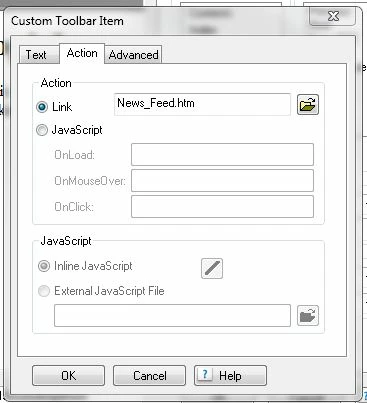
So, I have tried a few different things in the action tab

the actual web address (it's an intranet site ...website_name/index.htm

And just index.htm here (where it says News_Feed.htm)

This is a parent/child project -- the newsfeed page is the only page in the parent (and it is the default page) -- the button in the top toolbar takes you to the newsfeed, but we wanted it to refresh the entire page.

Thanks!


Okay, see if this works.

Instead of using the Link option, click the option for JavaScript.

Type the following code into the OnClick field:

parent.location='http://www.desiredsite.com/News_Feed.htm'

Dismiss all dialogs, regenerate and test.

Cheers... Rick

1 reply

Captiv8r
Legend
February 18, 2014

Hi Laura

Just create a link that will essentially point to the start page for your WebHelp. Start page opens, things reload and all books are once again collapsed. Easy peasy.

Cheers... Rick

February 18, 2014

I knew it had to be simple -- DUH!!!

Thanks!

Laura