Known Participant
January 22, 2016
Answered

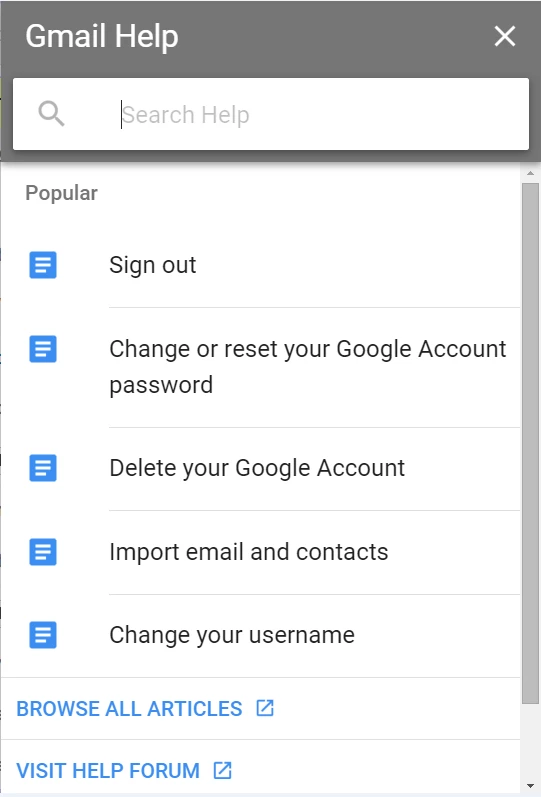
I am looking to create an Online Help that looks similar to the graphic attached. Can someone advise me as to the best approach I might take?
  • January 22, 2016
  • 3 replies
  • 1190 views

Thank you!

This topic has been closed for replies.
Correct answer Peter Grainge

The responsive layouts in RoboHelp 2015 are HTML5, as are the multiscreen layouts. The responsive layouts are much easier to work with.

The layout you show will almost certainly be something Google has created in-house but it is very similar to the layouts that ship with RoboHelp. I suggest you try one of the supplied layouts and then come back saying specifically how it is not what you want, if that is the case.

When you have generated a layout, keep resizing the window to see how it morphs as you reduce the size to mimic a tablet and a smartphone.


See www.grainge.org for RoboHelp and Authoring tips

@petergrainge

3 replies

Known Participant
March 15, 2016

Thank you, Peter and Jason. I am just beginning to define the requirements of a new Online Help system to be designed based on a newly developed clinical trial application. It will be necessary to have a format for both Desktop and Tablet to start, with Phone being a media to be used in the future.

I'm imagining there will be general changes wanted between the different media, particularly when it comes to Phone,

Inside the system will be both a set of PDFs and a set of videos for users to select to learn more about aspects of the application. An index and extensive search functionality will be required; I imagine also that context sensitive help will be wanted at some point in the future. At first, a list of of questions, built with links into bookmarks in the PDFs and links to the videos, is what is being asked of me. I'm still not sure this is a viable approach, and am hoping to use the HTML screens in RoboHelp instead or in addition to the PDFs.

I have been working in Azure Blue Screen Layout with Responsive HTML5 Output, but I'm starting to think it might be better to work in Multiscreen, if there are significant changes between the media types.

Before I start creating this system, can you provide any guidance as to which output I should use based on the above, and also what roadblocks I can expect to encounter?

Regards,

Sharon

Peter Grainge
Community Expert
Community Expert
March 16, 2016

I would favour Responsive over Multiscreen in most scenarios. It takes care of the change of layout between desktop, tablet and phone for you. You only need to worry about content. Multiscreen's advantage is if you want totally different appearances for each type of device.

I think Responsive is where more of Adobe's efforts will be going forward and that too is an important factor.

In your shoes I would create a small project with contrived topics that demo what you want to put in.


See www.grainge.org for RoboHelp and Authoring tips

@petergrainge

Use the menu (bottom right) to mark the Best Answer or Highlight particularly useful replies. Found the answer elsewhere? Share it here.
Known Participant
March 16, 2016

Thank you for your feedback, Peter. I am now beginning my prototype, and realizing I have an issue I have not come across before, which may mean that the concept of having multiple PDFs may be problematic. Here is a graphic of the concept of the Online Help:

Each question is supposed to have either a PDF associated with it, or a video, or both. My problem seems to be this: I need to have a single graphic be hyperlinked to multiple PDFs, and a single video graphic hyperlinked to multiple videos. Is this possible? If so, how do I do it?

Sharon

Inspiring
January 25, 2016

Further to Peter Grainge's response, the HTML5 settings allow the UI to be modified.  Choose the Customize Selected Layout button and from there you can modify the TOC and Sidebar areas including the fonts and icons.

-Jason

Known Participant
January 22, 2016

Clarification: I am using RoboHelp 2015 and may be using HTML5 or Responsive HTML, which I am still researching. Ultimately the system will be used on desktop and tablet.

sharon27lily

Peter Grainge
Community Expert
Peter GraingeCommunity ExpertCorrect answer
Community Expert
January 24, 2016

The responsive layouts in RoboHelp 2015 are HTML5, as are the multiscreen layouts. The responsive layouts are much easier to work with.

The layout you show will almost certainly be something Google has created in-house but it is very similar to the layouts that ship with RoboHelp. I suggest you try one of the supplied layouts and then come back saying specifically how it is not what you want, if that is the case.

When you have generated a layout, keep resizing the window to see how it morphs as you reduce the size to mimic a tablet and a smartphone.


See www.grainge.org for RoboHelp and Authoring tips

@petergrainge

Use the menu (bottom right) to mark the Best Answer or Highlight particularly useful replies. Found the answer elsewhere? Share it here.
